PUBG Console is receiving one of its biggest quality-of-life upgrades in years. As part of the 2026 development roadmap, Krafton has announced major improvements designed specifically for console players, including 120 FPS support on current-generation consoles, selectable graphics modes, faster menu loading, hit detection adjustments, and a redesigned controller layout. This guide explains every confirmed improvement, supported devices, and what these updates mean for the overall PUBG Console experience.
If you’re waiting for the latest features, you can also check our PUBG Mobile 4.5 Update guide.
Table of Contents
What Is the PUBG Console Experience Improvement?
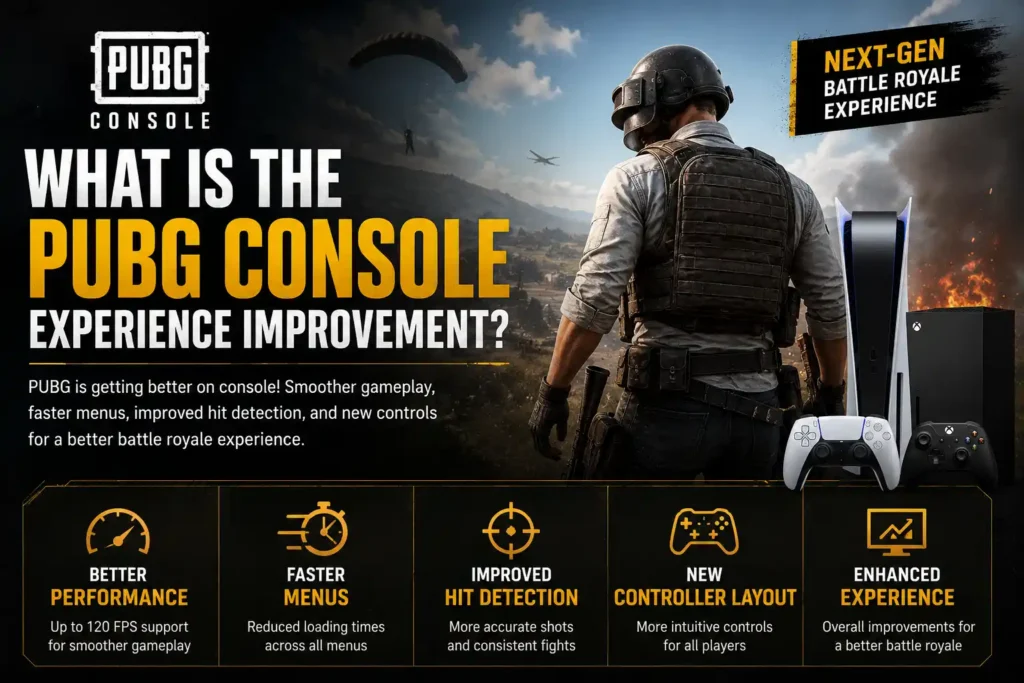
The PUBG Console Experience Improvement is a major update announced as part of PUBG’s 2026 roadmap to enhance the overall gameplay experience on current-generation consoles. Rather than introducing new game modes or maps, the update focuses on better performance, improved visuals, faster loading times, refined hit detection, and a more intuitive controller layout.
With these changes, PUBG Console players will be able to choose between Frame Rate Priority and Resolution Priority graphics modes, enjoy quicker menu navigation, and experience smoother gameplay on supported Xbox Series X|S and PlayStation 5 consoles. The goal is to modernize the console experience while preserving PUBG’s signature battle royale gameplay.
Why PUBG Console Needed These Changes
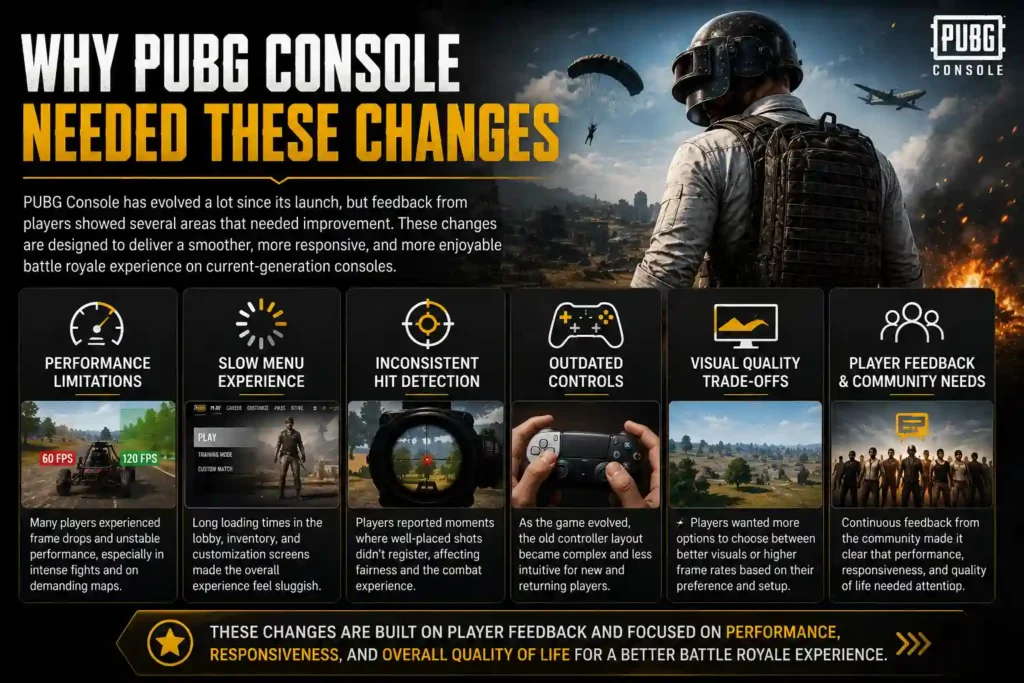
The expectations for console shooters have changed significantly over the past few years. Modern games now commonly offer 120 FPS support, multiple graphics modes, faster loading times, and more responsive controls, giving players a smoother and more competitive gaming experience. To stay competitive, PUBG Console also needs to evolve with these industry standards.
At the same time, PUBG has grown with new features, weapons, maps, and gameplay mechanics, making the controller layout more complex than before. By improving performance, simplifying controls, and optimizing menu navigation, these updates aim to make PUBG Console more accessible for new players while providing a better overall experience for long-time fans.
PUBG Console 120 FPS Support
PUBG on console now supports 120 FPS gameplay on compatible hardware, delivering much smoother movement, faster response times, and improved aiming precision. Players using the Xbox Series X, Xbox Series S, PlayStation 5, and PlayStation 5 Pro can enable 120Hz output through their console and connect to a monitor or TV that supports a 120Hz refresh rate. While frame rates may vary depending on the map and gameplay intensity, 120 FPS provides a noticeably smoother experience compared to the traditional 60 FPS mode. To enjoy PUBG at 120 FPS, make sure both your console’s display settings and your monitor or TV are configured for 120Hz, and that you’re using an HDMI cable capable of high refresh rates.
PUBG Console Graphics Modes Explained
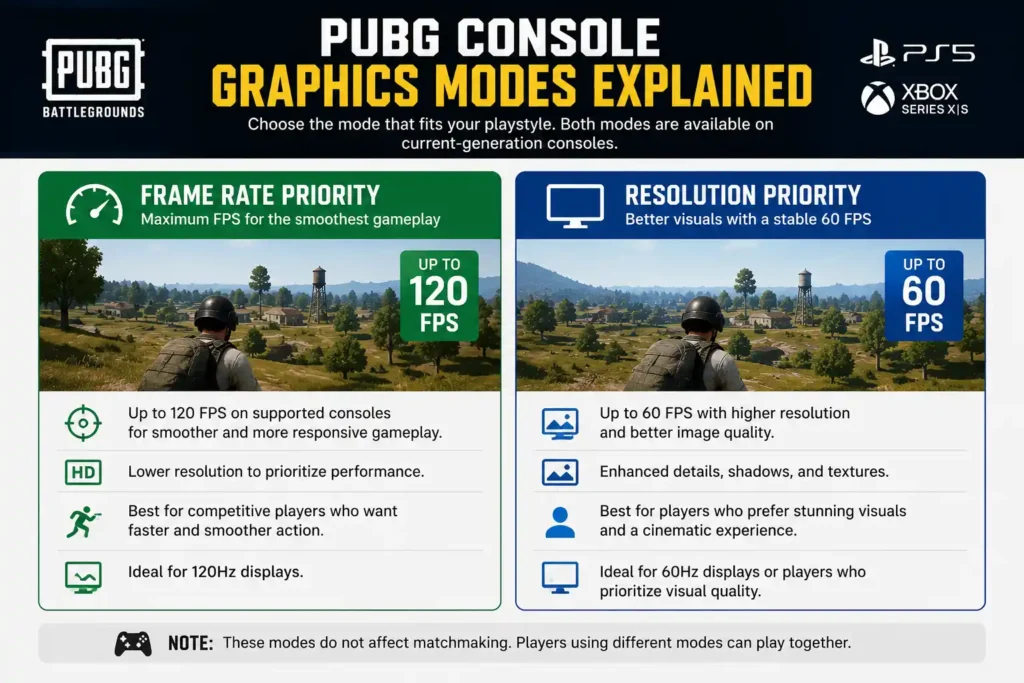
One of the biggest improvements coming to PUBG Console is the introduction of two selectable graphics modes. Players can now choose between Frame Rate Priority and Resolution Priority, allowing them to customize the game based on their display setup and preferred play style.
Frame Rate Priority
Frame Rate Priority is designed for players who want the smoothest gameplay possible. This mode increases the frame rate to up to 120 FPS on supported current-generation consoles when connected to a 120Hz display. The higher frame rate delivers smoother animations, reduced input delay, and improved responsiveness during combat, making it the ideal choice for competitive players.
Best for:
- Competitive players
- Ranked matches
- Fast-paced gunfights
- Players using a 120Hz TV or monitor
Resolution Priority
Resolution Priority focuses on delivering the highest possible image quality while maintaining a stable 60 FPS. This mode offers sharper textures, improved visual clarity, and a more detailed environment, making it ideal for players who prefer immersive graphics over maximum frame rates.
Best for:
- Casual players
- Story and exploration
- Large-screen 4K TVs
- Players who prioritize visual quality
Which Graphics Mode Should You Choose?
If you own a 120Hz display and want the most responsive gameplay, Frame Rate Priority is the better option. However, if your display supports only 60Hz or you prefer sharper visuals with consistent performance, Resolution Priority is the recommended choice.
PUBG Console allows players to switch between these modes through the graphics settings, giving everyone the flexibility to choose the experience that best suits their hardware and play style.
PUBG Console Graphics Mode Specifications
PUBG Console introduces two graphics modes across current-generation consoles, giving players the flexibility to prioritize either smoother gameplay or higher visual quality. The maximum resolution and frame rate available depend on the console you’re using.
| Console | Frame Rate Priority | Resolution Priority |
|---|---|---|
| Xbox Series S | 1080p / 120 FPS | 1440p / 60 FPS |
| Xbox Series X | 1440p / 120 FPS | 2160p (4K) / 60 FPS |
| PlayStation 5 | 1440p / 120 FPS | 1800p / 60 FPS |
| PlayStation 5 Pro | 1800p / 120 FPS | 2160p (4K) / 60 FPS |
Dynamic Resolution Scaling
All supported consoles use dynamic resolution scaling, meaning the game automatically adjusts the rendering resolution during demanding gameplay to maintain stable performance. This helps reduce frame drops during intense firefights or large-scale battles while providing the smoothest possible experience.
120Hz Display Requirement
The Frame Rate Priority mode is available only when your console is connected to a 120Hz-compatible TV or monitor. If you’re using a standard 60Hz display, you’ll continue playing at up to 60 FPS, even on supported consoles.
HDR Compatibility
Some players may need to disable HDR in their console’s display settings to enable the Frame Rate Priority option. This depends on your console, TV, and display configuration, so checking your video output settings is recommended if the 120 FPS mode doesn’t appear.
Note: Players using different graphics modes can still play together in the same online matches, so choosing a graphics mode won’t affect matchmaking or multiplayer compatibility.
Frame Rate Priority vs Resolution Priority
Choosing the right graphics mode depends on whether you prioritize smooth gameplay or higher visual quality. Both modes offer a different experience, allowing players to select the option that best matches their gaming setup and play style.
| Feature | Frame Rate Priority | Resolution Priority |
|---|---|---|
| Maximum FPS | Up to 120 FPS | Up to 60 FPS |
| Visual Quality | Good | Excellent |
| Gameplay Smoothness | Excellent | Good |
| Input Response | Faster | Standard |
| Competitive Gaming | ⭐ Best Choice | Good |
| Casual Gaming | Good | ⭐ Best Choice |
| Best For | Fast-paced matches and ranked play | Sharper visuals and immersive gameplay |
Which Mode Should You Choose?
If you’re a competitive player looking for smoother movement, quicker response times, and reduced input lag, Frame Rate Priority is the recommended option. It delivers up to 120 FPS on supported current-generation consoles when connected to a 120Hz-compatible display, making it ideal for intense gunfights and ranked matches.
On the other hand, if you prefer sharper graphics, improved image quality, and a more cinematic experience, Resolution Priority is the better choice. This mode runs at up to 60 FPS while rendering at a higher resolution, making it suitable for players who value visual detail over maximum frame rate.
Recommendation: If your TV or monitor supports 120Hz, choose Frame Rate Priority for the smoothest PUBG Console experience. Otherwise, Resolution Priority offers the best balance of image quality and stable performance on 60Hz displays.
Faster Menu Loading Improvements
Another important part of the PUBG Console experience improvement is the optimization of out-game loading speeds. While this update doesn’t directly affect gameplay, it significantly improves the time players spend navigating menus before entering a match.
With Update 42.2, PUBG Console aims to reduce loading times across frequently used sections, including the lobby, inventory, customization menus, and matchmaking interface. Players should notice smoother transitions between menus, quicker access to game settings, and less waiting when preparing for matches.
These optimizations are designed to make the overall experience feel faster and more responsive. Instead of spending extra time loading different screens, players can move through the game’s interface more efficiently and get into matches with fewer delays. According to the developers, menu optimization will continue in future updates as part of their ongoing effort to improve the PUBG Console experience.
PUBG Console Hit Detection Improvements
Hit detection is another key area receiving attention as part of PUBG’s console experience improvements. Instead of changing weapon balance, the developers are focusing on making shot registration more accurate and consistent, so players are less likely to experience situations where a well-aimed shot appears to miss unexpectedly.
The update will refine how hitboxes are detected during combat, helping ensure that shots landing on an opponent are registered more reliably. This should result in smoother and more responsive gunfights while maintaining PUBG Console’s signature tactical gameplay.
Key Improvements
- More accurate hit registration during firefights.
- Refined hitboxes for improved shot consistency.
- Better combat responsiveness in close- and long-range engagements.
- Optimizations developed specifically for PUBG Console.
No Weapon Balance Changes
It’s important to note that these improvements do not affect weapon balance. Core gameplay mechanics will remain the same, including:
- No changes to weapon damage.
- No adjustments to recoil patterns.
- No modifications to fire rate.
- No weapon buffs or nerfs.
- No changes to PUBG PC, as this update is exclusive to console.
Overall, these hit detection improvements are designed to make combat feel more dependable without altering the familiar gunplay that PUBG Console players have enjoyed for years.
New Controller Layout
Alongside performance improvements, PUBG Console is introducing a new default controller layout to make gameplay more intuitive for both new and returning players. As the game has expanded with additional mechanics and features over the years, the existing control scheme has become more complex. The updated layout aims to simplify controls while keeping core gameplay familiar.
According to the developers, the new controller scheme assigns clearer roles to each side of the controller. The left side focuses primarily on movement and camera control, while the right side is dedicated to actions, interactions, and combat. This approach is intended to create a more consistent and easier-to-learn control experience.
Benefits of the New Controller Layout
- Easier for new players to learn the controls.
- More intuitive button placement for common actions.
- Fewer control conflicts during fast-paced gameplay.
- Improved accessibility with a more consistent button layout.
- Existing controller presets will remain available for players who prefer the current controls.
Potential Drawbacks
While the new layout offers several improvements, some long-time PUBG Console players may need time to adjust. Players who have built muscle memory using the current control scheme may initially prefer to continue using the existing presets until they become familiar with the updated layout.
Overall, the redesigned controller scheme is intended to reduce the learning curve for new players while giving experienced players the flexibility to choose the control setup that best suits their play style.
PUBG Console Experience Improvement Release Date
The first phase of the PUBG Console Experience Improvement will be released with Update 42.2 in July 2026. This update introduces two major enhancements for current-generation consoles: Graphics Modes and faster out-game loading speeds, allowing players to enjoy smoother gameplay and quicker menu navigation.
However, not all improvements will arrive at the same time. PUBG developers have confirmed that additional features, including console-specific hit detection improvements and the new default controller layout, will be rolled out in future updates after completing further testing and validation.
Release Timeline
| Feature | Release Status |
|---|---|
| Graphics Modes (Frame Rate & Resolution Priority) | ✅ Update 42.2 (July 2026) |
| Faster Menu Loading | ✅ Update 42.2 (July 2026) |
| Hit Detection Improvements | ⏳ Coming in a future update |
| New Controller Layout | ⏳ Coming in a future update |
While Update 42.2 marks the beginning of PUBG’s console improvement roadmap, the developers have stated that they will continue refining the console experience with additional optimizations and quality-of-life updates throughout future releases.
What These Improvements Mean for Players
The upcoming PUBG Console experience improvements are designed to benefit every type of player, whether you’re a competitive veteran or someone returning to the game after a long break. By focusing on performance, usability, and responsiveness, these updates aim to create a smoother and more enjoyable experience across current-generation consoles.
Competitive Players
Players who enjoy ranked matches and intense gunfights will benefit the most from Frame Rate Priority mode, which supports up to 120 FPS on compatible hardware. Combined with improved hit detection, the update can provide smoother gameplay, quicker response times, and a more consistent combat experience.
Casual Players
For players who prefer a relaxed gaming experience, Resolution Priority mode delivers sharper visuals while maintaining a stable 60 FPS. Faster menu loading also reduces waiting time, making it easier to jump into matches and navigate the game’s interface.
New Console Players
The redesigned controller layout is expected to make PUBG easier to learn for newcomers. With a more intuitive button arrangement and simplified controls, new players can become familiar with the game’s mechanics more quickly without changing PUBG’s core gameplay.
Returning Players
Players coming back to PUBG after a long break will notice several quality-of-life improvements, including smoother performance, faster menu navigation, updated graphics options, and a more refined overall console experience. These enhancements make returning to the battlegrounds more enjoyable without requiring players to relearn the game’s fundamentals.
Overall, the 2026 console improvements focus on modernizing PUBG’s gameplay experience while preserving the tactical combat and battle royale mechanics that have made the game popular among console players for years.
Pros and Cons of PUBG Console Experience Improvements
| Pros | Cons |
|---|---|
| Supports up to 120 FPS on compatible current-generation consoles. | 120 FPS mode requires a 120Hz TV or monitor to work. |
| Two graphics modes let players choose between higher FPS or better visuals. | Dynamic resolution scaling may reduce resolution during demanding gameplay. |
| Faster menu loading improves navigation through the lobby, inventory, and customization screens. | Some players may need to disable HDR to enable Frame Rate Priority mode. |
| Improved hit detection aims to deliver more accurate and consistent gunfights. | Long-time players may need time to adjust to the new default controller layout. |
| Redesigned controller scheme makes the game easier for new players to learn. | Hit detection improvements and controller updates will arrive in future updates, not with Update 42.2. |
| Players using different graphics modes can still play together in the same matches. | Some features are available only on current-generation consoles. |
Verdict
Overall, the PUBG Console experience improvements focus on delivering smoother performance, better responsiveness, and a more modern gameplay experience. While some features depend on compatible hardware and will roll out in stages, the update brings meaningful quality-of-life improvements for both competitive and casual console players.
FAQ
Does PUBG Console support 120 FPS now?
Yes, PUBG Console is introducing 120 FPS support through the new Frame Rate Priority graphics mode. However, this feature is available only on supported current-generation consoles and requires a 120Hz-compatible TV or monitor.
Which consoles support 120 FPS?
The following consoles support up to 120 FPS in Frame Rate Priority mode:
Xbox Series S
Xbox Series X
PlayStation 5
PlayStation 5 Pro
Older console generations do not support this new graphics mode.
Do I need a 120Hz monitor or TV?
Yes. To enable Frame Rate Priority and experience gameplay at up to 120 FPS, you’ll need a display that supports 120Hz output. If you’re using a standard 60Hz display, the game will continue to run at up to 60 FPS.
Will the hit detection update affect PUBG PC?
No. The hit detection improvements announced by the developers are exclusive to PUBG Console. The update will not change hit registration, weapon balance, or gameplay mechanics on the PC version.
Does the PUBG Console experience improvement include better graphics?
Yes. PUBG Console now offers a Resolution Priority mode that increases image quality while maintaining up to 60 FPS. Players can also choose Frame Rate Priority for smoother gameplay at up to 120 FPS, depending on their console and display.
Can I keep my current controller layout?
Yes. PUBG will introduce a new default controller layout, but existing controller presets will remain available. Players who are comfortable with the current controls can continue using their preferred layout without switching to the new default scheme.