Last Updated: 23 September 2026
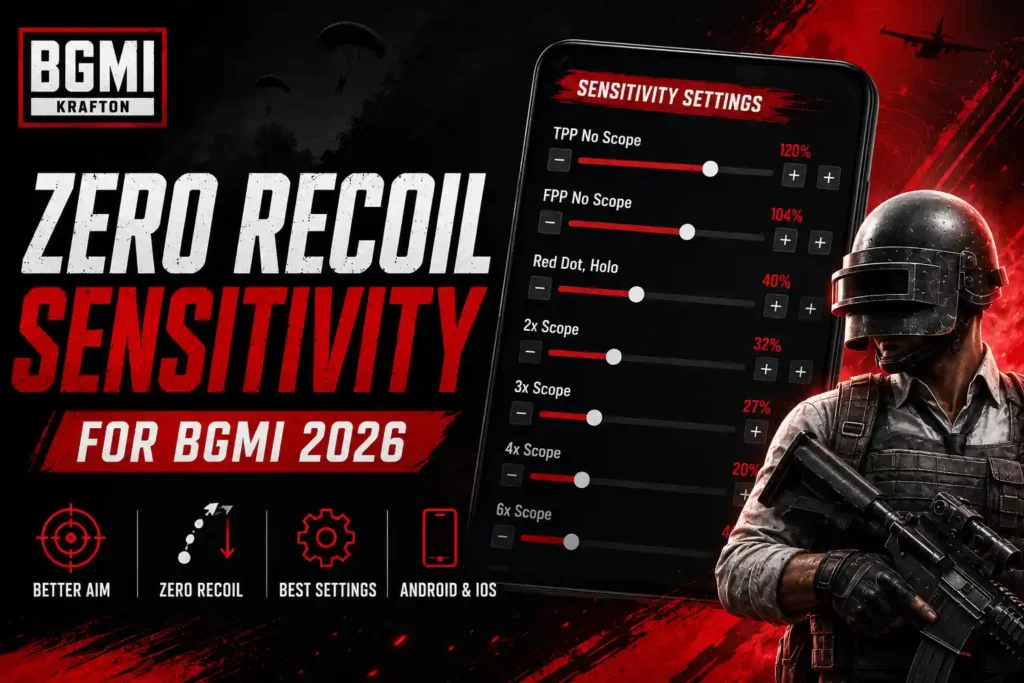
Looking for the best zero recoil sensitivity for BGMI? The right Camera, ADS, and Gyroscope settings can make weapon recoil easier to control and help you maintain more accurate sprays. However, no sensitivity setting can completely remove recoil from the game.
In this guide, you’ll find recommended BGMI zero recoil sensitivity settings and codes for Android and iOS, along with Gyroscope and non-Gyroscope setups, weapon-specific settings, and tips for adjusting sensitivity to your device and playstyle.
Table of Contents
Quick BGMI Sensitivity Codes
If you want to apply a BGMI sensitivity setup quickly, use the code that matches your device and Gyroscope preference:
| Setup | Sensitivity Code |
|---|---|
| BGMI Zero Recoil – Main Code | 7120-0643-8249-5640-805 |
| Android – Gyroscope | 1-7641-4465-0608-4437-142 |
| iPhone/iOS | 7350-5353-1699-2688-280 |
| Android – Non-Gyroscope | 1-7641-4784-5071-7394-773 |
Which code should you use? Android players using Gyroscope can start with the Android Gyroscope code, while non-Gyroscope players should use the Non-Gyro code. iPhone and iPad users can try the iOS code. If you’re unsure, start with the main sensitivity code and test it in Training Ground.
Note: These codes are designed to make recoil easier to control, not completely eliminate weapon recoil. Sensitivity can feel different depending on your device, FPS, touch response, Gyroscope usage, and playstyle. Always test the imported settings before playing ranked matches.
What Is Zero Recoil Sensitivity in BGMI?
Zero recoil sensitivity refers to a combination of BGMI Camera, ADS, and Gyroscope settings designed to make weapon recoil easier to control during sprays. These settings help players keep their crosshair more stable while firing, especially with automatic weapons.
The ideal sensitivity depends on your device, FPS, gyroscope usage, and playstyle. A setting that works well for one player may feel too fast or too slow for another, so use these values as a starting point and fine-tune them in Training Ground.
If you want to improve your recoil control and gyro aiming, check out our guide to Jonathan Gaming Sensitivity for his latest BGMI settings and sensitivity code.
BGMI Sensitivity Code No Recoil
If you’re looking for a BGMI sensitivity code for no recoil, you can try 7120-0643-8249-5640-805. This code provides a ready-to-use sensitivity setup designed to help improve recoil control, aiming stability, and overall shooting accuracy. After applying the code, test it in the Training Ground and make small adjustments based on your device, control layout, and personal playstyle, as the same sensitivity may feel different for every player.
BGMI Zero Recoil Sensitivity 2026
The following settings are designed as a starting point for better recoil control in BGMI. They focus on keeping the crosshair stable during sprays while maintaining enough responsiveness for close- and mid-range fights. Test the settings in Training Ground and adjust them according to your device and playstyle.
Camera Sensitivity
| Scope | Sensitivity |
|---|---|
| TPP No Scope | 120% |
| FPP No Scope | 120% |
| Red Dot/Holo | 50% |
| 2x Scope | 35% |
| 3x Scope | 25% |
| 4x Scope | 20% |
| 6x Scope | 12% |
| 8x Scope | 10% |
ADS Sensitivity
| Scope | Sensitivity |
|---|---|
| TPP No Scope | 100% |
| FPP No Scope | 100% |
| Red Dot/Holo | 50% |
| 2x Scope | 35% |
| 3x Scope | 25% |
| 4x Scope | 20% |
| 6x Scope | 12% |
| 8x Scope | 10% |
Gyroscope Sensitivity
| Scope | Sensitivity |
|---|---|
| TPP No Scope | 300% |
| FPP No Scope | 300% |
| Red Dot/Holo | 300% |
| 2x Scope | 300% |
| 3x Scope | 240% |
| 4x Scope | 220% |
| 6x Scope | 100% |
| 8x Scope | 70% |
Tip: If the crosshair moves too quickly with these settings, reduce the Gyroscope sensitivity gradually instead of changing every setting at once. Practice M416 sprays at different distances to find the values that feel most comfortable on your device.
Zero Recoil Sensitivity BGMI Code for Android
Android players can use this 0 recoil sensitivity BGMI code to quickly apply a complete setup instead of entering each Camera, ADS, and Gyroscope value manually. The code below is intended as a starting point for recoil control and smoother sprays on Android devices.
BGMI Zero Recoil Sensitivity Code Gyroscope
Note: Sensitivity codes can become invalid or change after BGMI updates. Always test the imported settings in Training Ground before using them in ranked matches.
How to Import the Sensitivity Code
- Open BGMI on your Android phone.
- Go to Settings → Sensitivity.
- Open the sensitivity code or cloud-management option.
- Enter or paste the code.
- Apply the settings.
- Test your recoil control in Training Ground.
- Adjust the values if the sensitivity feels too fast or slow.
Tip: Don’t claim that any code provides literally “zero recoil.” The code only provides sensitivity values designed to make recoil easier to control.
Zero Recoil Sensitivity BGMI Code for iPhone
iPhone and iPad players can also use customized sensitivity settings to improve recoil control in BGMI. However, the ideal values can vary depending on the device model, screen size, FPS, and whether you use Gyroscope.
For iOS players, start with the recommended settings below and test them in Training Ground before using them in ranked matches. If the aim feels too fast or unstable, adjust the sensitivity gradually rather than changing all values at once.
Recommended iOS Sensitivity
| Scope | Camera | ADS | Gyroscope |
|---|---|---|---|
| TPP No Scope | 120% | 100% | 300% |
| FPP No Scope | 120% | 100% | 300% |
| Red Dot/Holo | 50% | 50% | 300% |
| 2x Scope | 35% | 35% | 300% |
| 3x Scope | 25% | 25% | 240% |
| 4x Scope | 20% | 20% | 220% |
| 6x Scope | 12% | 12% | 100% |
| 8x Scope | 10% | 10% | 70% |
Tip: These values are a starting point, not a guaranteed zero-recoil setup. Your device and personal aiming style can significantly affect how the sensitivity feels.
Zero Recoil Gyroscope Settings
Gyroscope can make recoil control easier by allowing you to move your phone to adjust the crosshair while firing. A higher Gyroscope sensitivity can help with faster recoil adjustments, but it may feel difficult to control at first.
For a zero-recoil-style setup, use the following values as a starting point:
| Scope | Gyroscope Sensitivity |
|---|---|
| TPP No Scope | 300% |
| FPP No Scope | 300% |
| Red Dot/Holo | 300% |
| 2x Scope | 300% |
| 3x Scope | 240% |
| 4x Scope | 220% |
| 6x Scope | 100% |
| 8x Scope | 70% |
Tips for Using High Gyroscope Sensitivity
- Start with Always On Gyroscope if you’re comfortable using gyro.
- Practice M416 sprays at different distances.
- If the crosshair moves too quickly, reduce the value gradually.
- Avoid changing multiple sensitivity settings at the same time.
- Test your settings in Training Ground before using them in ranked matches.
These settings won’t completely eliminate weapon recoil, but they can provide better control when combined with proper spray technique and consistent practice.
If you want to learn how a professional BGMI player uses sensitivity and Gyroscope settings, check out our detailed Jonathan Gaming guide covering his biography, career, team, device, and sensitivity setup.
Non Gyro Zero Recoil Sensitivity Code 2026
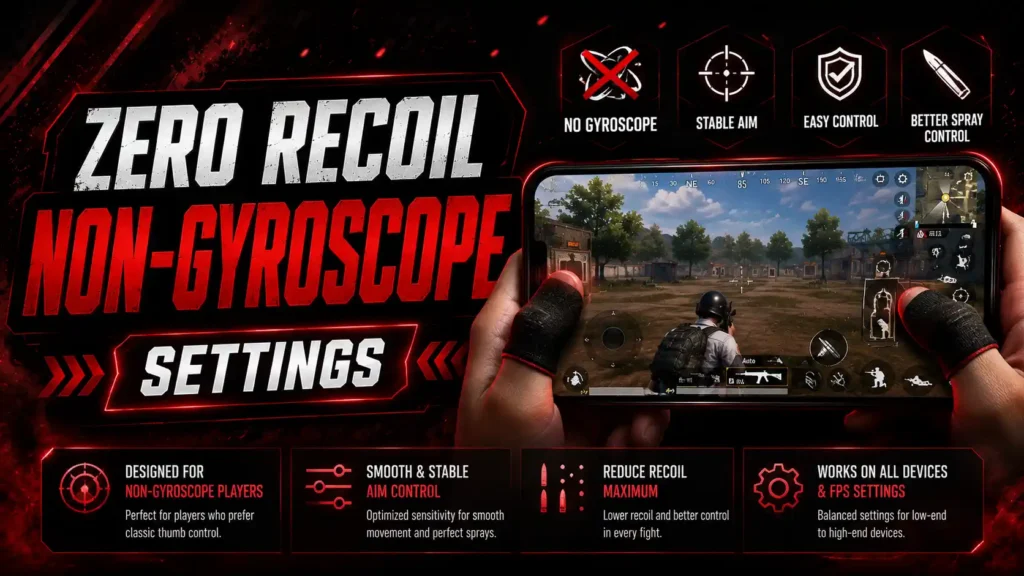
If you don’t use Gyroscope in BGMI, you can still improve recoil control by optimizing your Camera and ADS sensitivity. These settings are designed for players who prefer controlling recoil with their fingers instead of tilting the device.
| Scope | Camera Sensitivity | ADS Sensitivity |
|---|---|---|
| TPP No Scope | 120% | 100% |
| FPP No Scope | 120% | 100% |
| Red Dot/Holo | 50% | 50% |
| 2x Scope | 35% | 35% |
| 3x Scope | 25% | 25% |
| 4x Scope | 20% | 20% |
| 6x Scope | 12% | 12% |
| 8x Scope | 10% | 10% |
Tips for Non-Gyroscope Players
- Keep your ADS sensitivity comfortable for recoil control.
- Practice pulling the screen downward while spraying.
- Start with Red Dot and 2x sprays before moving to higher scopes.
- Test different values in Training Ground.
- Make small adjustments instead of changing your entire setup at once.
These settings can make recoil easier to manage, but they won’t completely remove weapon recoil. Your finger control, FPS stability, and practice also play an important role.
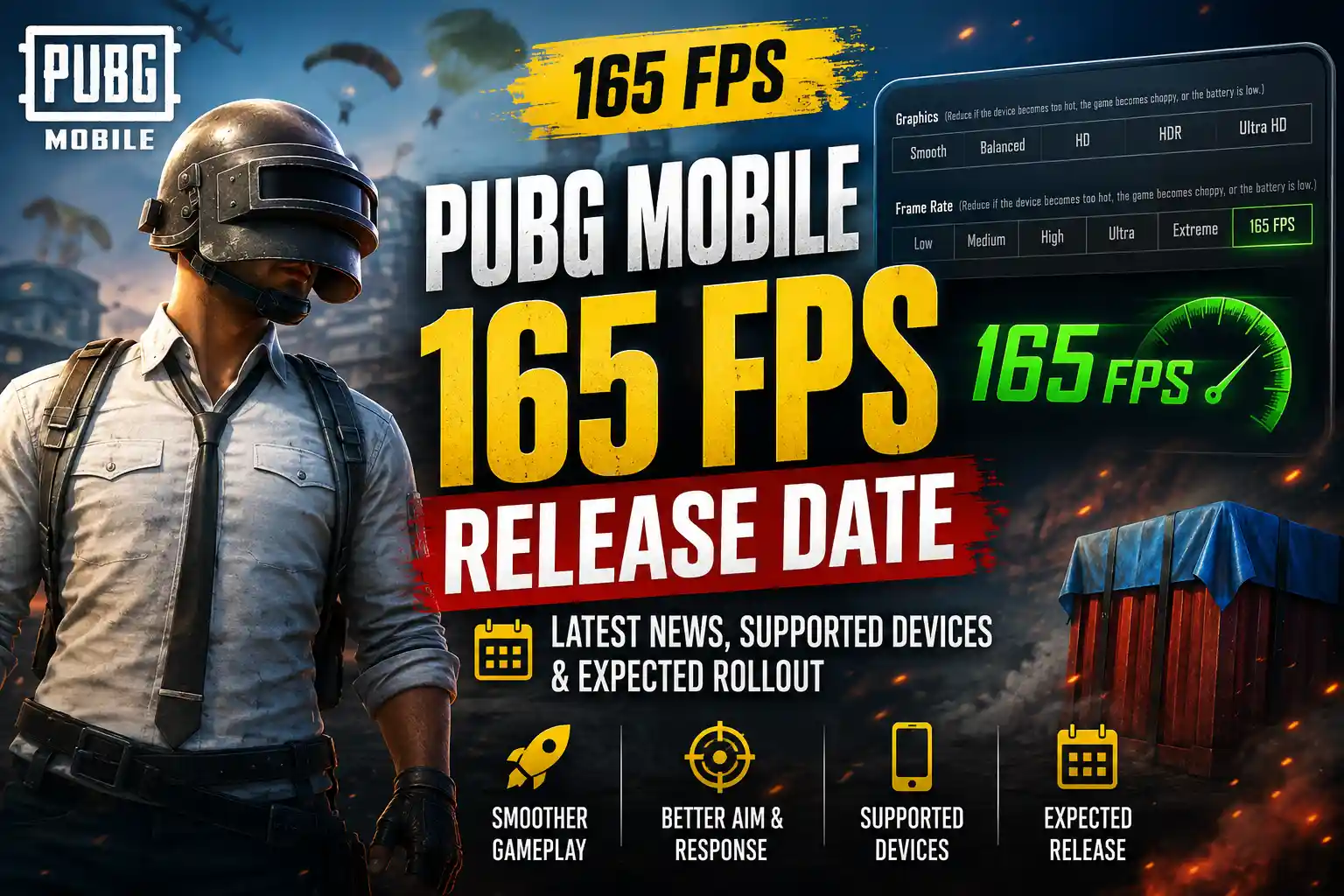
If you want to know when this feature may arrive, check our guide on the BGMI 165 FPS release date and supported devices.
Best Zero Recoil Sensitivity for M416
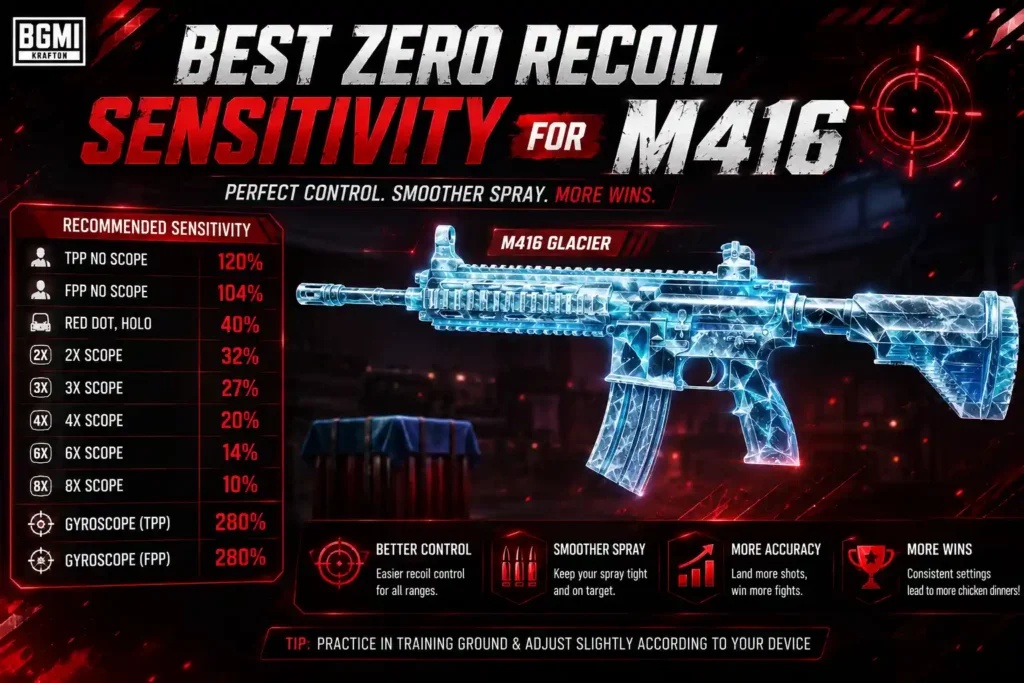
The M416 is one of the most popular assault rifles in BGMI because of its controllable recoil and versatility at different ranges. The right sensitivity can make M416 sprays smoother and help you keep the crosshair more stable while firing.
Recommended M416 Sensitivity
| Scope | Camera | ADS | Gyroscope |
|---|---|---|---|
| Red Dot/Holo | 50% | 50% | 300% |
| 2x Scope | 35% | 35% | 300% |
| 3x Scope | 25% | 25% | 240% |
| 4x Scope | 20% | 20% | 220% |
| 6x Scope | 12% | 12% | 100% |
Tips for Better M416 Sprays
- Use Red Dot or 3x for consistent mid-range sprays.
- If using Gyroscope, practice controlling vertical recoil with small phone movements.
- Test your M416 spray at different distances in Training Ground.
- Adjust sensitivity gradually if the crosshair feels too fast or too slow.
- A good sensitivity setup improves recoil control, but it does not completely eliminate the weapon’s recoil.
For the best results, combine these settings with a stable FPS, comfortable grip, and consistent spray practice.
Best Zero Recoil Sensitivity for AKM and M762
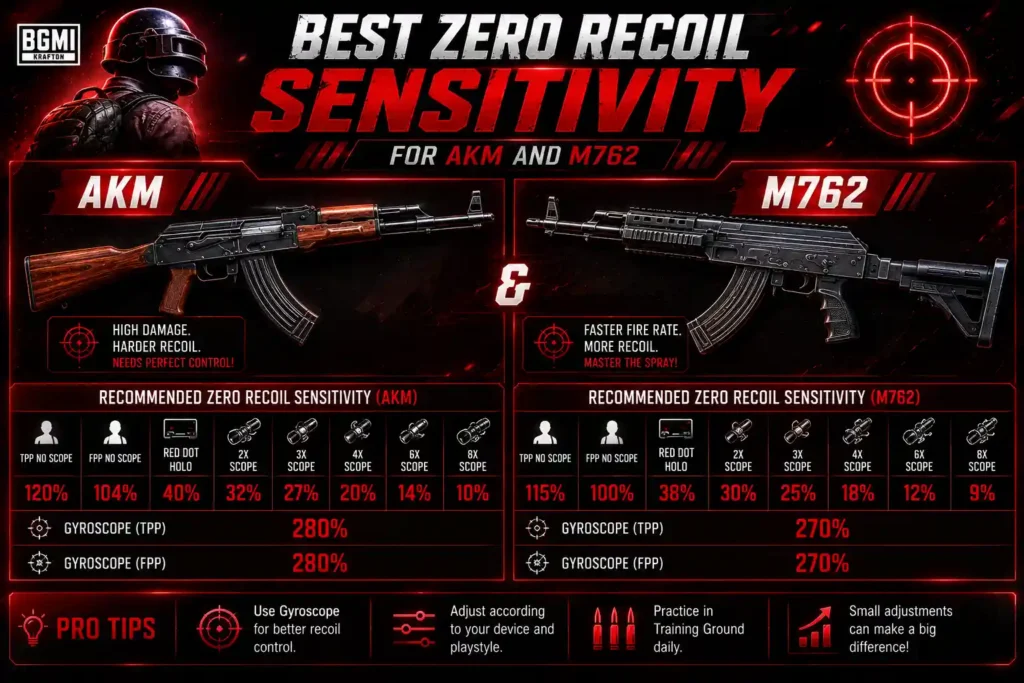
The AKM and M762 have stronger recoil than the M416, so they require more precise recoil control during automatic sprays. The settings below provide a starting point for players who want smoother sprays with these weapons.
| Scope | Camera | ADS | Gyroscope |
|---|---|---|---|
| Red Dot/Holo | 50% | 50% | 300% |
| 2x Scope | 35% | 35% | 300% |
| 3x Scope | 25% | 25% | 240% |
| 4x Scope | 20% | 20% | 220% |
| 6x Scope | 12% | 12% | 100% |
AKM Spray Tips
- Start with Red Dot or 2x for easier recoil control.
- Pull down smoothly rather than making sudden movements.
- Use short bursts when fighting at longer distances.
- Practice standing and crouching sprays separately.
M762 Spray Tips
- Use Red Dot or 2x for close- and mid-range fights.
- Gyroscope can make the weapon easier to control during continuous sprays.
- Practice controlling the stronger vertical recoil in Training Ground.
- Adjust your sensitivity gradually if the crosshair moves too quickly.
These settings are a starting point rather than a guaranteed zero-recoil setup. Your device, FPS, grip, and individual aiming style can affect the results.
Best Sensitivity for Different FPS
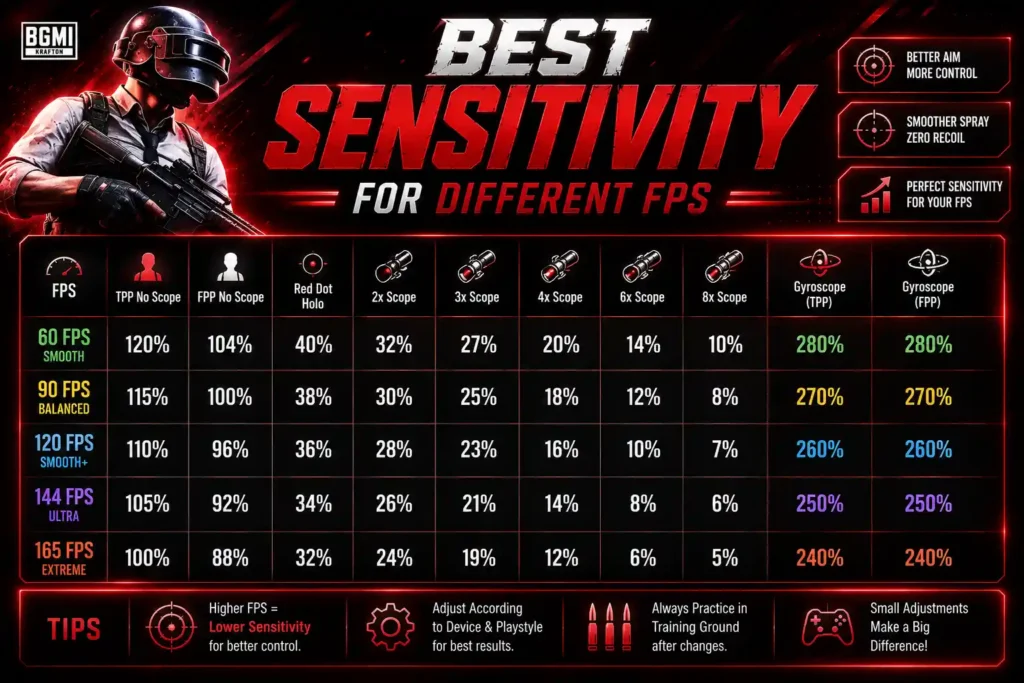
Your FPS can affect how sensitivity feels in BGMI. Higher and more stable FPS generally makes aiming and recoil control feel more responsive, while unstable FPS can make the same sensitivity feel inconsistent. Use the settings below as a starting point and fine-tune them for your device.
60 FPS
For 60 FPS devices, start with moderate sensitivity values and focus on consistent recoil control.
- Red Dot/Holo: 50% Camera / 50% ADS
- 2x: 35% Camera / 35% ADS
- 3x: 25% Camera / 25% ADS
- 4x: 20% Camera / 20% ADS
- Gyroscope: 300% for Red Dot, gradually lower for higher scopes
90 FPS
90 FPS provides a smoother aiming experience, allowing players to make quicker adjustments.
- Red Dot/Holo: 50% Camera / 50% ADS
- 2x: 35% Camera / 35% ADS
- 3x: 25% Camera / 25% ADS
- 4x: 20% Camera / 20% ADS
- Gyroscope: 300% for Red Dot and 2x
120 FPS
Players using 120 FPS can use similar sensitivity values but may prefer slightly lower settings if the crosshair feels overly responsive.
- Red Dot/Holo: 45–50% Camera / 45–50% ADS
- 2x: 30–35% Camera / 30–35% ADS
- 3x: 20–25% Camera / 20–25% ADS
- 4x: 18–20% Camera / 18–20% ADS
- Gyroscope: 250–300% for Red Dot and 2x
Tip: FPS does not automatically determine the best sensitivity. Your device, touch response, screen size, Gyroscope performance, and personal muscle memory also matter. Test your settings at your normal FPS and make small adjustments until your sprays feel consistent.
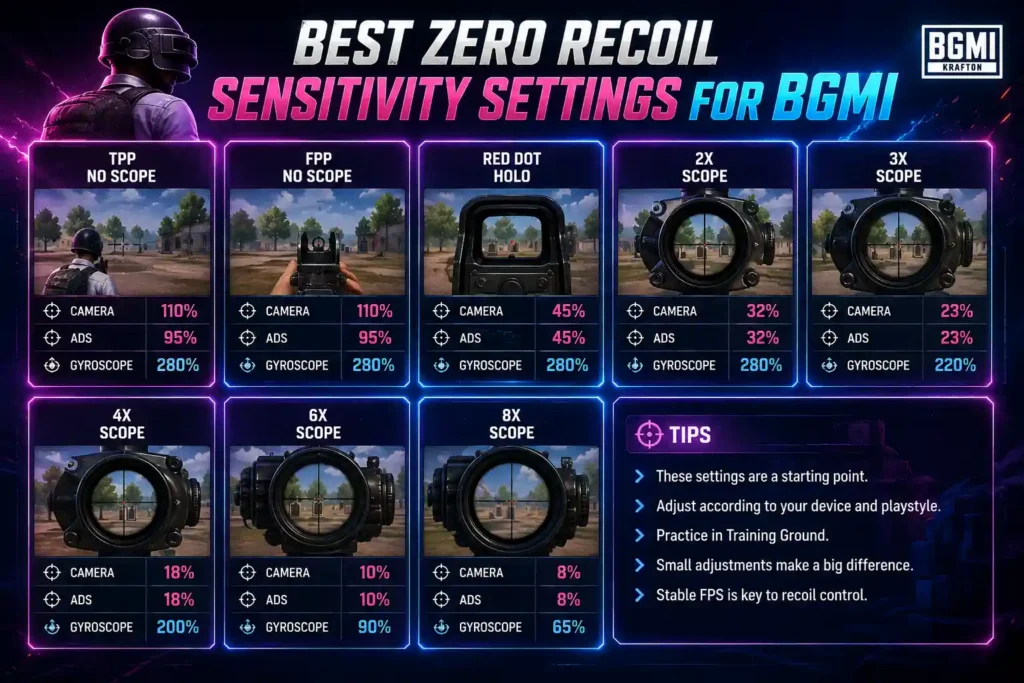
Best Zero Recoil Settings for Low-End Android Phones
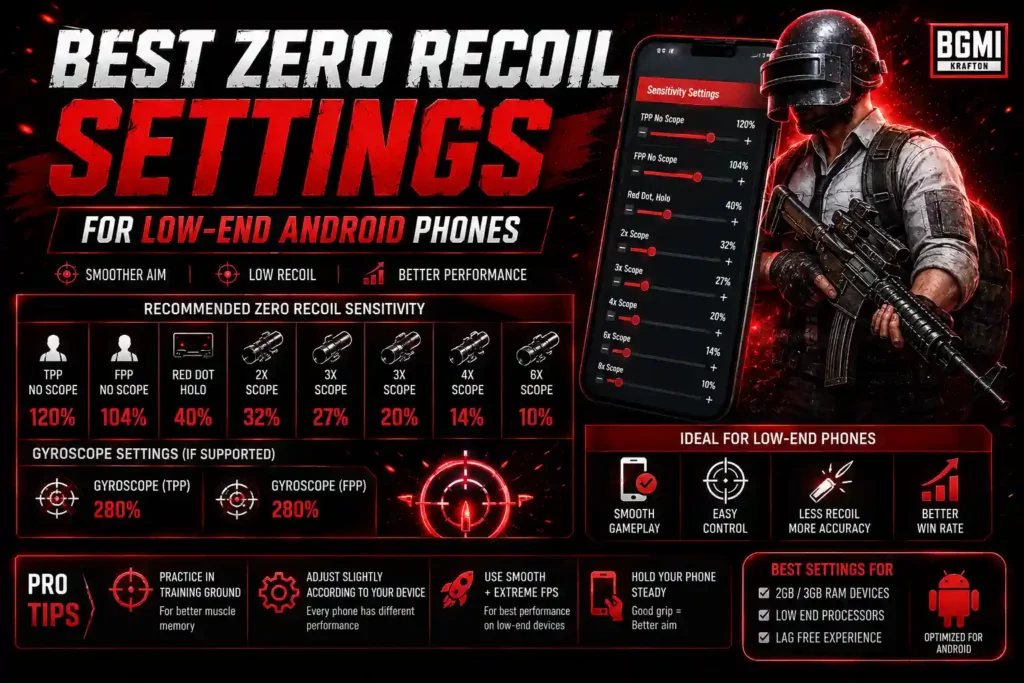
Low-end Android phones can still achieve good recoil control in BGMI, but stable FPS and consistent touch response are more important than simply using very high sensitivity. The settings below provide a balanced starting point for devices that may struggle to maintain high FPS.
| Scope | Camera | ADS | Gyroscope |
|---|---|---|---|
| TPP No Scope | 110% | 95% | 280% |
| FPP No Scope | 110% | 95% | 280% |
| Red Dot/Holo | 45% | 45% | 280% |
| 2x Scope | 32% | 32% | 280% |
| 3x Scope | 23% | 23% | 220% |
| 4x Scope | 18% | 18% | 200% |
| 6x Scope | 10% | 10% | 90% |
| 8x Scope | 8% | 8% | 65% |
Tips for Low-End Devices
- Prioritize stable FPS over maximum graphics quality.
- Avoid using extremely high sensitivity if your touch response feels inconsistent.
- Test your settings at your device’s normal FPS.
- Use Training Ground to test M416, AKM, and M762 sprays.
- Make small sensitivity adjustments instead of copying settings from high-end devices.
- Keep background apps closed when playing to reduce performance issues.
Tip: There is no universal zero-recoil setting for every Android phone. Use these values as a starting point and adjust them based on your device’s FPS, touch response, and playstyle.
How to Import a BGMI Sensitivity Code
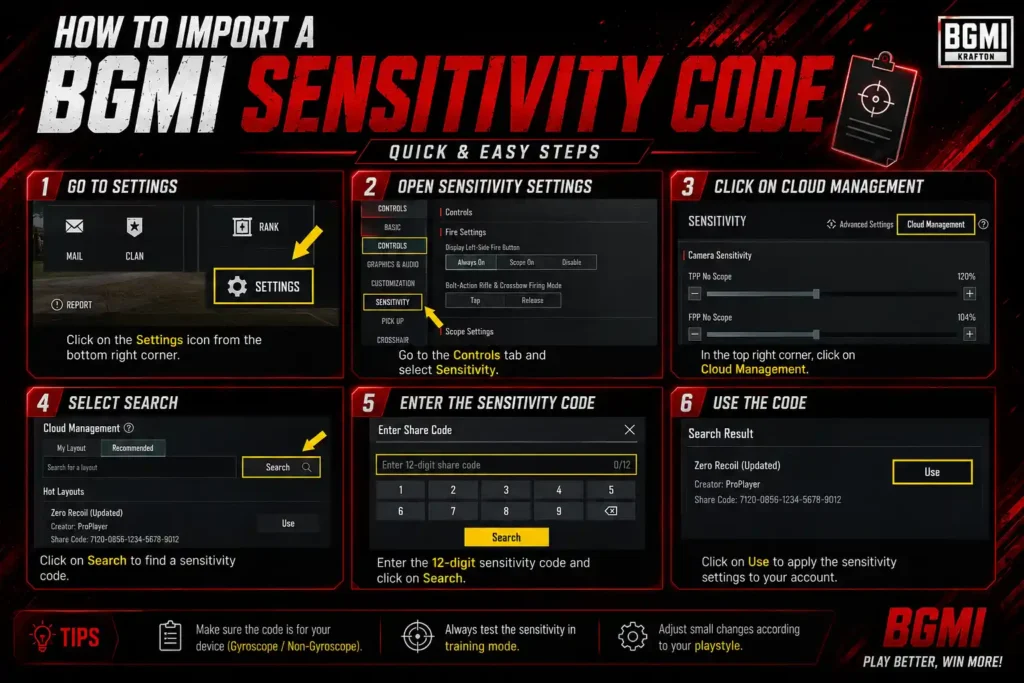
Using a sensitivity code allows you to apply a complete sensitivity setup without manually entering every value. Follow these steps to import a sensitivity code in BGMI:
- Open BGMI on your device.
- Go to Settings from the main menu.
- Select Sensitivity.
- Look for the option to import, search, or use a sensitivity code.
- Enter or paste the sensitivity code you want to use.
- Preview the settings if the option is available.
- Select Apply or confirm the import.
- Enter Training Ground and test the sensitivity before playing ranked matches.
If the Code Doesn’t Work
Sensitivity codes can become unavailable or incompatible after game updates. If a code doesn’t work:
- Check that you entered the code correctly.
- Make sure you’re using the correct BGMI version.
- Try importing the code again.
- Use the sensitivity values manually if necessary.
- Test the settings before using them in competitive matches.
Tip: Don’t assume that a sensitivity code will work perfectly on every device. Use the imported settings as a starting point and adjust them based on your FPS, touch response, Gyroscope performance, and personal playstyle.
Looking for more ways to customize your BGMI profile? Check out our BGMI Name Style guide for stylish names, fonts, symbols, and copy-paste name ideas.
How to Test Your Sensitivity
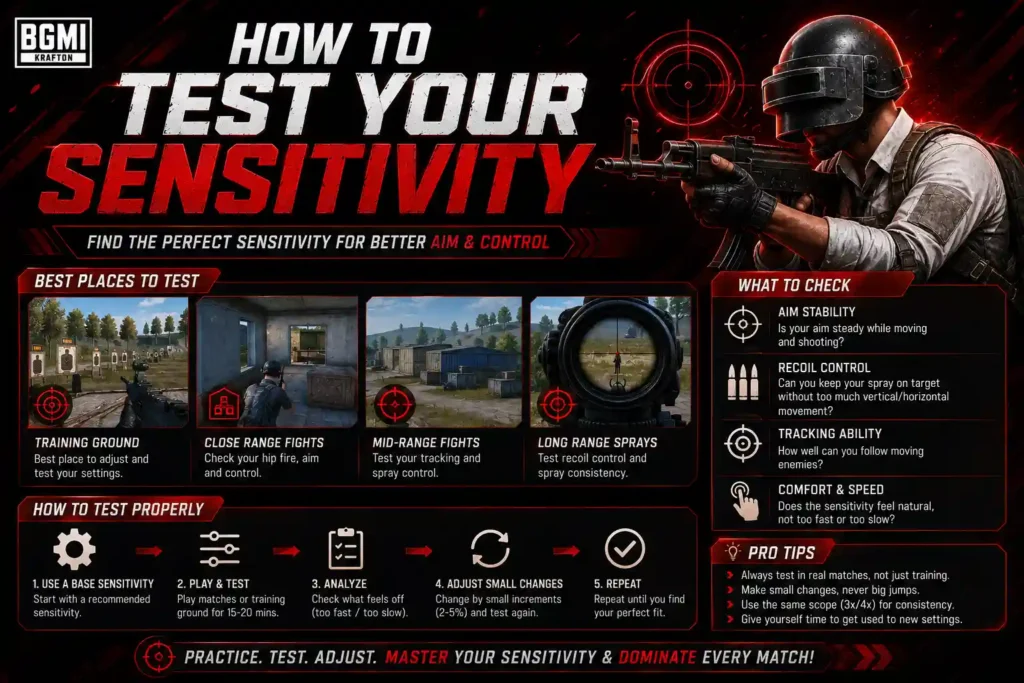
After importing a sensitivity code, don’t immediately use it in ranked matches. Test the settings in Training Ground first and make small adjustments based on how your aim and recoil feel.
Simple Testing Process
- Test Red Dot Spray – Use an M416 and practice close-range sprays.
- Test 3x Spray – Practice mid-range sprays to check recoil control.
- Test 4x Spray – Try longer-range sprays and observe crosshair movement.
- Test Moving Targets – Practice tracking moving targets while firing.
- Check Gyroscope – If you use Gyroscope, make sure the crosshair doesn’t move too quickly or slowly.
- Change One Setting at a Time – Adjust only one sensitivity value and test it again.
- Play a Few Matches – Once the settings feel comfortable in Training Ground, use them in Classic matches before making further changes.
Tip: Don’t keep changing your sensitivity after every match. Give yourself time to build muscle memory and adjust only when you identify a specific problem with your aim or recoil control.
Why Your BGMI Recoil Is Still High
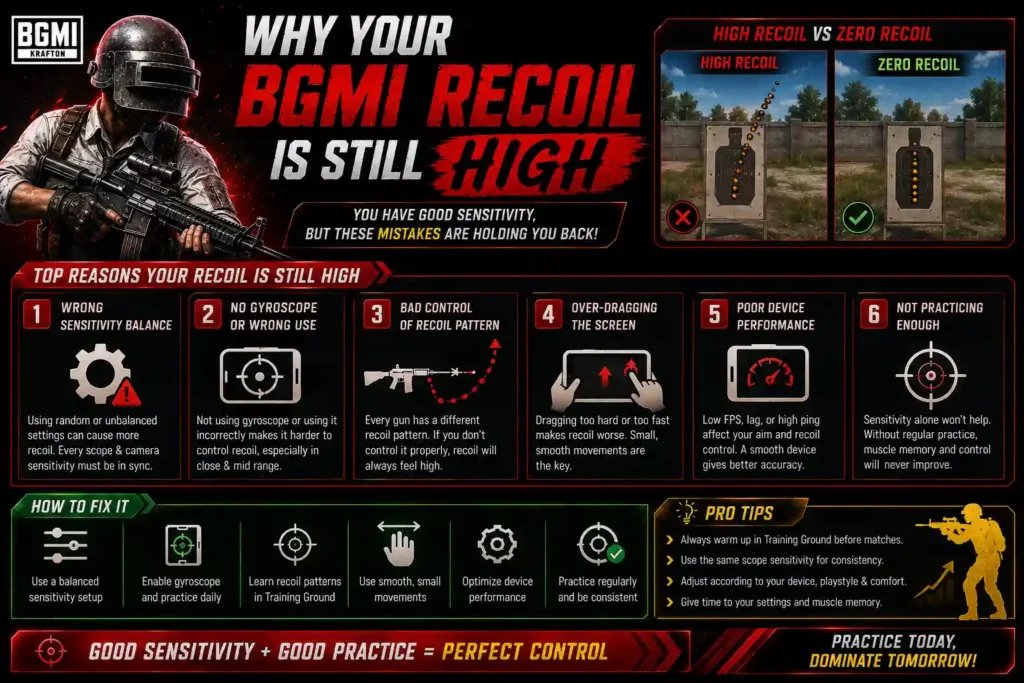
Even with a good sensitivity setup, you may still experience noticeable recoil in BGMI. Sensitivity is only one part of recoil control, and your device, FPS, Gyroscope settings, weapon, and aiming technique can all affect your spray.
Common reasons include:
- Sensitivity is too high or too low: Extreme values can make your crosshair difficult to control.
- Unstable FPS: Frame drops can make aiming and recoil control feel inconsistent.
- Poor Gyroscope control: High gyro sensitivity requires practice and precise phone movement.
- Incorrect ADS sensitivity: ADS settings affect how your aim behaves while firing.
- Weapon differences: The M416, AKM, and M762 have different recoil patterns, so the same settings may not feel identical.
- Lack of practice: Even a good sensitivity setup requires muscle memory and consistent training.
- Different devices: Screen size, touch response, refresh rate, and Gyroscope performance can change how sensitivity feels.
Tip: Don’t immediately increase your sensitivity when recoil feels difficult. First identify whether the problem comes from your settings, FPS, device response, or spray technique, then make small adjustments and test again in Training Ground.
Common Mistakes When Using Zero Recoil Codes
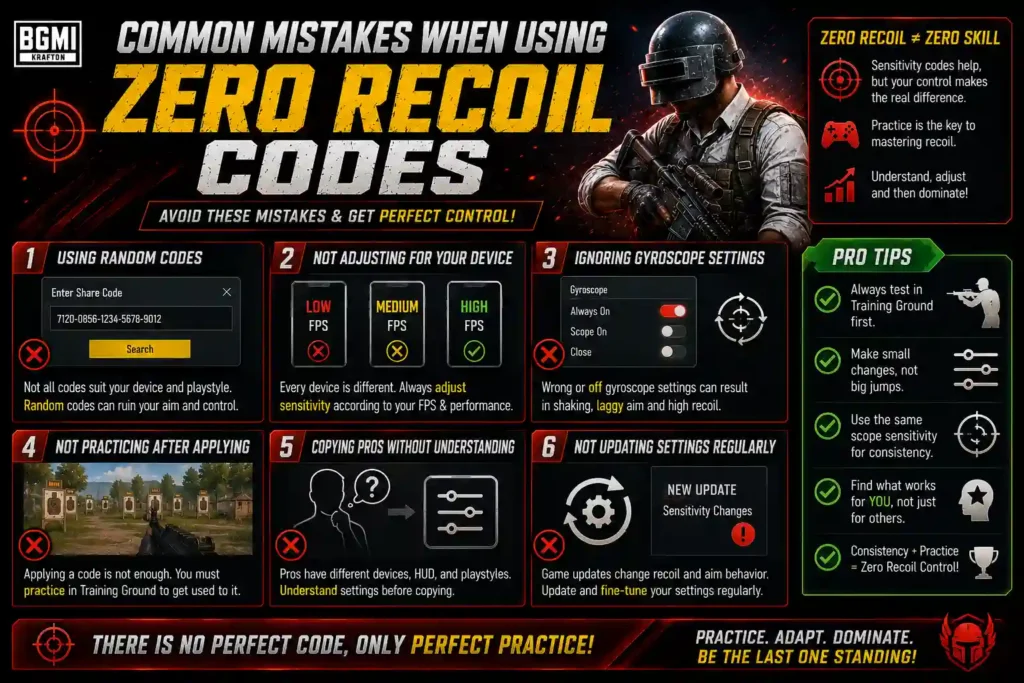
Using a zero-recoil sensitivity code can help you get started, but many players make mistakes after importing one. Avoid these common problems:
- Expecting zero recoil: A sensitivity code cannot completely remove weapon recoil.
- Copying settings blindly: A setup that works for one player may feel different on your device.
- Using an outdated code: Sensitivity codes can change or stop working after BGMI updates.
- Skipping Training Ground: Always test the imported settings before using them in ranked matches.
- Changing everything at once: Adjust one sensitivity value at a time so you know what actually improves your aim.
- Ignoring FPS: Unstable FPS can make the same sensitivity feel inconsistent.
- Changing settings too frequently: Give yourself time to develop muscle memory before making further adjustments.
Tip: Treat a zero-recoil code as a starting point rather than a guaranteed solution. The best sensitivity is the one that feels consistent and controllable on your own device.
Frequently Asked Questions
What is the best zero recoil sensitivity for BGMI?
There is no universal zero-recoil setting. The best sensitivity depends on your device, FPS, Gyroscope usage, and playstyle.
What is the latest zero recoil sensitivity code for Android?
The code provided in this guide is a starting point for Android players. Always test the code after importing it because codes can change after BGMI updates.
Does zero recoil sensitivity actually remove recoil?
No. Sensitivity settings cannot completely remove weapon recoil. They can only make recoil easier to control.
Is zero recoil sensitivity different on iPhone?
It can be. Screen size, touch response, FPS, and Gyroscope performance can make the same sensitivity feel different on iOS devices.
Should I use Gyroscope for zero recoil?
Gyroscope can make recoil control easier, especially during automatic sprays, but it requires practice and isn’t necessary for every player.
What is the best M416 sensitivity in BGMI?
M416 sensitivity depends on your device and aiming style. Red Dot, 3x, and 4x settings are particularly important for M416 spray control.
Can I use the same sensitivity on every phone?
You can use the same starting values, but you may need to adjust them based on your phone’s screen, FPS, touch response, and Gyroscope.
Why isn’t my sensitivity code working?
The code may be outdated, entered incorrectly, or incompatible with the current BGMI version. Check the code and try importing it again.
How do I import a sensitivity code in BGMI?
Go to Settings → Sensitivity, find the sensitivity code/import option, enter the code, and apply the settings. Menu names may vary between versions.
Can beginners use high Gyroscope sensitivity?
Beginners can use Gyroscope, but very high sensitivity may be difficult to control initially. Start lower and increase it gradually as your control improves.
The right zero recoil sensitivity for BGMI can make sprays smoother and improve recoil control, but no sensitivity code can completely eliminate weapon recoil. The best settings depend on your device, FPS, Gyroscope usage, and playstyle. Use the recommended settings and codes in this guide as a starting point, test them in Training Ground, and make small adjustments until you find a setup that feels comfortable and consistent.