| Setting | Details |
|---|---|
| WMax Gaming Sensitivity Code | 1-7685-6026-6366-3140-885 |
| WMax Gaming BGMI ID | 587178093 |
| Game | BGMI |
| Device | iPhone 16 Pro Max |
| Control Layout | 3 Fingers Claw |
| Finger Setup | Claw |
| Gyroscope | Always On |
| Graphics | Smooth |
| FPS | 120 Fps |
| Playstyle | Aggressive |
| Sensitivity Type | High Gyroscope |
Latest Update: 29 September 2026
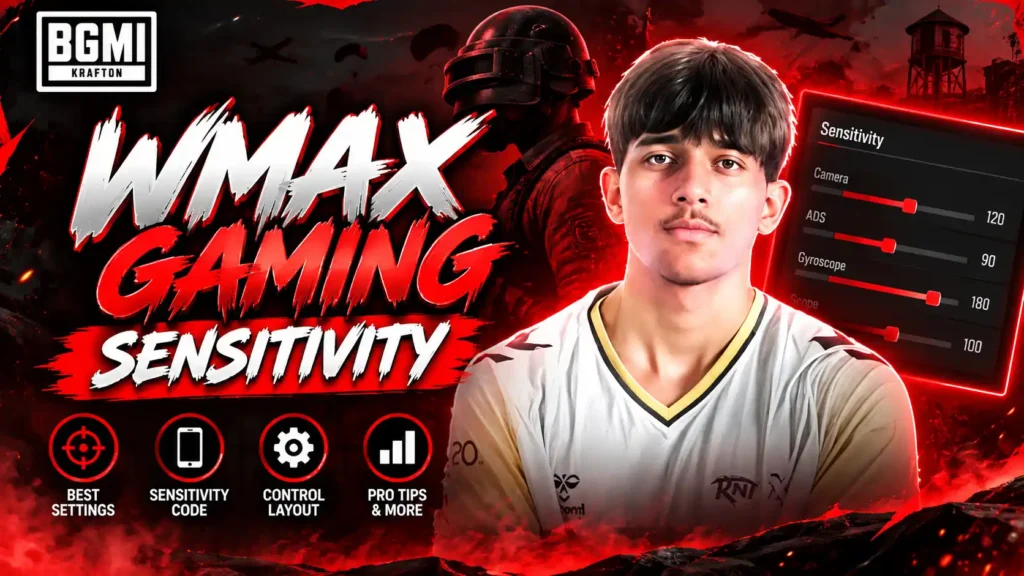
WMax Gaming is a popular BGMI player and live streamer known for his fast reflexes, aggressive gameplay, and entertaining challenges. His streams often feature rank-push sessions, high-kill matches, and challenges suggested by his viewers, making his content engaging for BGMI fans. With his unique playing style and interactive streams, WMax Gaming has built a strong following in the BGMI community. Many players also look for his sensitivity settings and control setup to understand how he plays and use similar settings to improve their own gameplay.
In this guide, you’ll find WMax Gaming’s latest camera, ADS, gyroscope, and free-look sensitivity settings, along with his sensitivity code. We’ll also cover a few practical tips to help you adjust these settings based on your device, controls, and personal playstyle.
Table of Contents
Wmax Gaming BGMI Sensitivity
Lens
Camera Sensitivity
| Scope | Sensitivity |
|---|---|
| TPP No Scope | 300% |
| FPP No Scope | 300% |
| TPP Aim | 300% |
| FPP Aim | 300% |
| Red Dot, Holographic, Iron Sight & Canted Sight | 12% |
| 2x Scope | 10% |
| 3x Scope, Win94 | 4% |
| 4x Scope, VSS | 4% |
| 6x Scope | 12% |
| 8x Scope | 10% |
ADS Sensitivity
| Scope | ADS Sensitivity |
|---|---|
| TPP No Scope | 300% |
| FPP No Scope | 300% |
| TPP Aim | 300% |
| FPP Aim | 300% |
| Red Dot, Holographic, Iron Sight & Canted Sight | 1% |
| 2x Scope | 1% |
| 3x Scope, Win94 | 1% |
| 4x Scope, VSS | 1% |
| 6x Scope | 1% |
| 8x Scope | 5% |
Camera Sensitivity (Free Look)
| Setting | Sensitivity |
|---|---|
| TPP (Character, Vehicle) | 300% |
| FPP (Character) | 300% |
| Camera (Parachuting) | 300 % |
WMax Gaming Gyroscope Sensitivity (Latest)
| Scope | Gyroscope Sensitivity |
|---|---|
| TPP No Scope | 400% |
| FPP No Scope | 400% |
| TPP Aim | 400% |
| FPP Aim | 400% |
| Red Dot, Holographic, Iron Sight & Canted Sight | 230% |
| 2x Scope | 75% |
| 3x Scope, Win94 | 135% |
| 4x Scope, VSS | 120% |
| 6x Scope | 42% |
| 8x Scope | 44% |
ADS Gyroscope Sensitivity
WMax Gaming ADS Gyroscope Sensitivity (Latest)
| Scope | ADS Gyroscope Sensitivity |
|---|---|
| TPP No Scope | 400% |
| FPP No Scope | 400% |
| TPP Aim | 400% |
| FPP AIm | 400% |
| Red Dot, Holographic, Iron Sight & Canted Sight | 265% |
| 2x Scope | 75% |
| 3x Scope, Win94 | 150% |
| 4x Scope, VSS | 140% |
| 6x Scope | 42% |
| 8x Scope | 56% |
WMax Gaming’s BGMI sensitivity setup is built around fast camera movement, quick reactions, and strong gyroscope control. His camera sensitivity is set very high for TPP and FPP movement, while the scope sensitivities are kept comparatively lower for better control when aiming.
The gyroscope settings stand out, with 400% sensitivity for no-scope movement and high values for close-range scopes such as Red Dot and Holographic. His ADS Gyroscope settings also follow a similar approach, helping with recoil control and quick adjustments during intense fights. However, sensitivity is highly dependent on your device, FPS, touch response, and playing style, so these settings may need some adjustment rather than being copied exactly.
If you’re wondering when PUBG Mobile will officially support 165 FPS, check our detailed guide on the PUBG Mobile 165 FPS Release Date for the latest updates and device compatibility.
WMax Gaming Sensitivity Code 2026
If you want to try WMax Gaming Sensitivity Code 2026 without manually entering each value, you can import it using the sensitivity code below.
Note: WMax Gaming’s sensitivity code may change after settings, device, or BGMI updates. If it stops working, enter the settings manually.
Looking for another professional BGMI setup? Check out our Jonathan Gaming Sensitivity 2026 guide for his latest sensitivity settings and controls.
How to use WMax Gaming BGMI Sensitivity Code 2026 in your Device in 4 Steps?
Importing the sensitivity code takes only a few seconds:
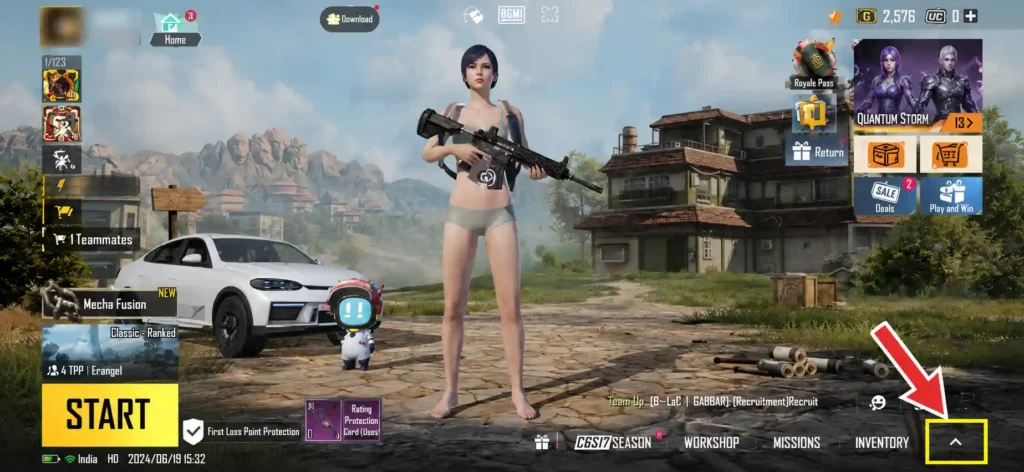
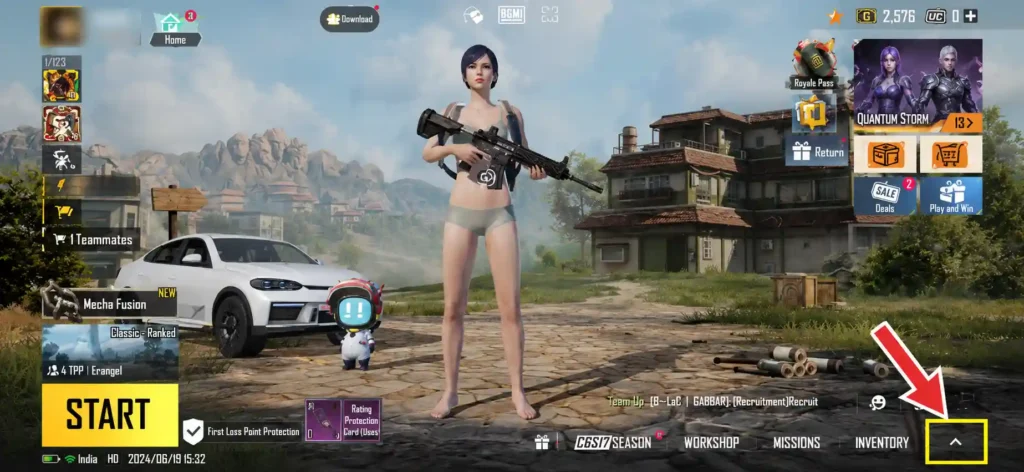
Step 1: Tap on the arrow on the bottom right corner of the screen to open settings.
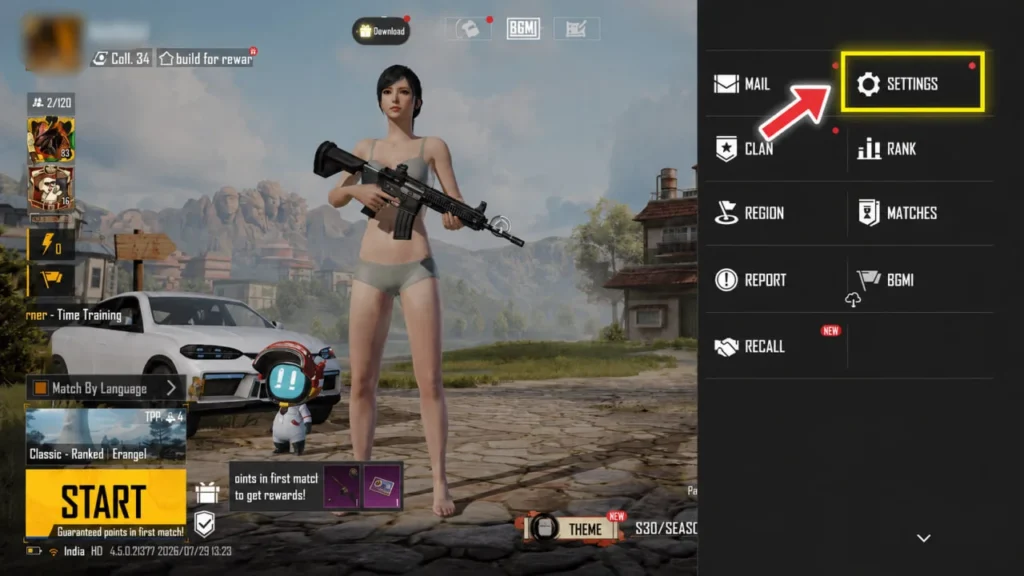
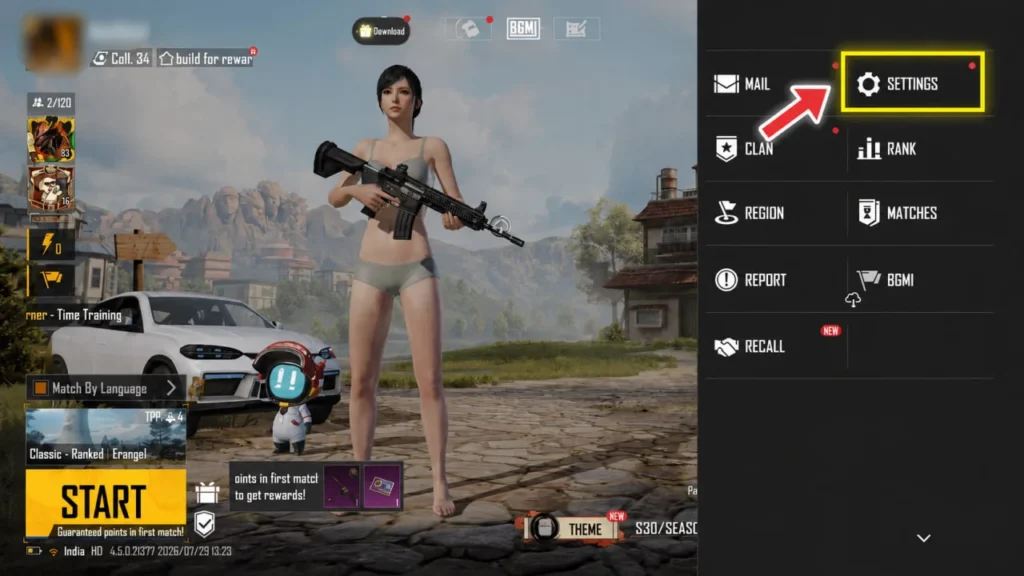
Step 2: Click Settings.
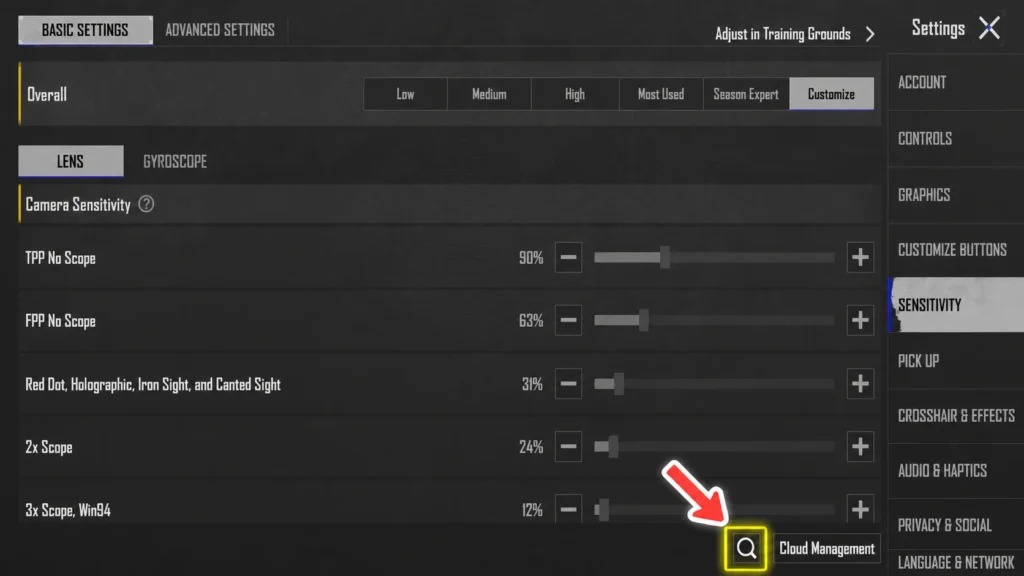
Step 3: Click on the Search Icon.
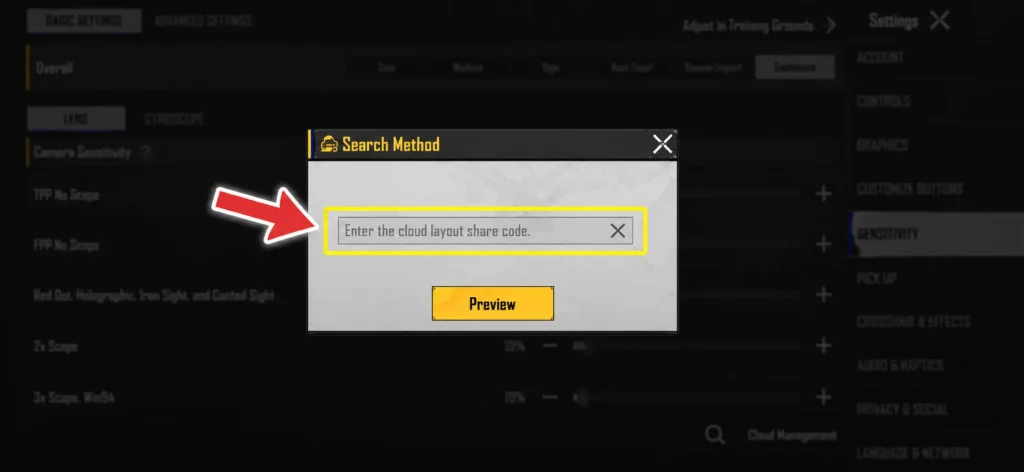
Step 4: Click and Paste the Code.
Now you are ready to use WMax Gaming’s Sensitivity.
PUBG Lite Release Date: When Is PUBG LIGHT Coming Out?
Want to know when PUBG Mobile LIGHT is coming out? Check the latest release date, pre-registration details, download size, Android and iOS availability, features, maps, and everything announced so far.
PUBG Lite Release Date: When Is PUBG LIGHT Coming Out?WMax Gaming Control Code 2026
If you want to try the BGMI sensitivity code 2026 and button layout used by WMax Gaming without setting everything up manually, you can import his latest gaming control code 2026. With just a few taps, you can copy his HUD layout and get a setup inspired by the controls featured in his gameplay and livestreams.
Note: WMax Gaming may change his controls after updates or device changes. If the code stops working, use the screenshots below to set up the layout manually.
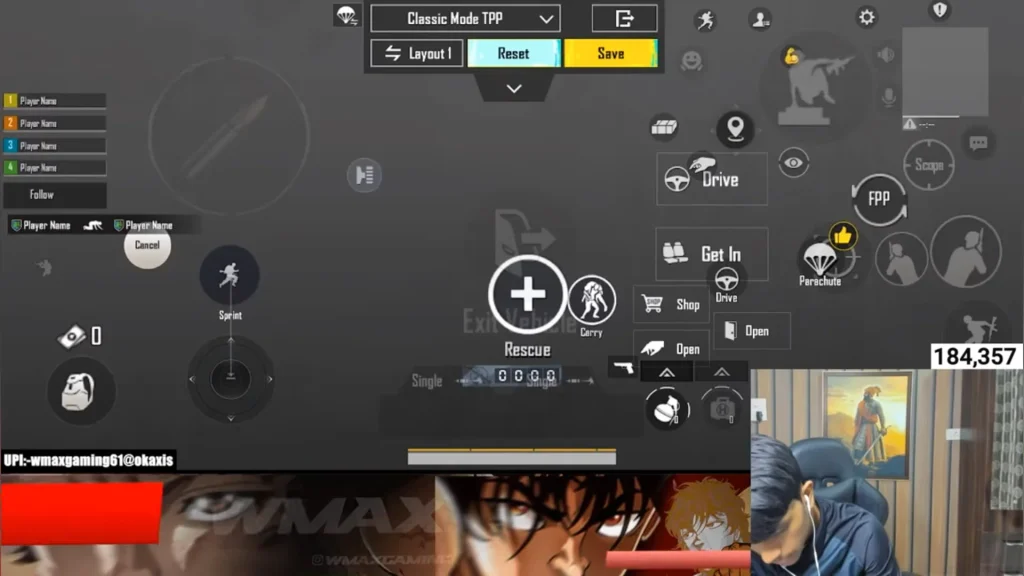
How to Import WMax Gaming Control Code?
Here is how you can use WMax gaming’s control code in 5 steps:-
Step 1: Tap on the arrow on the bottom right corner of the screen.
Step 2: Click the Setting icon.
Step 3: Click on Customize Buttons and Customize.
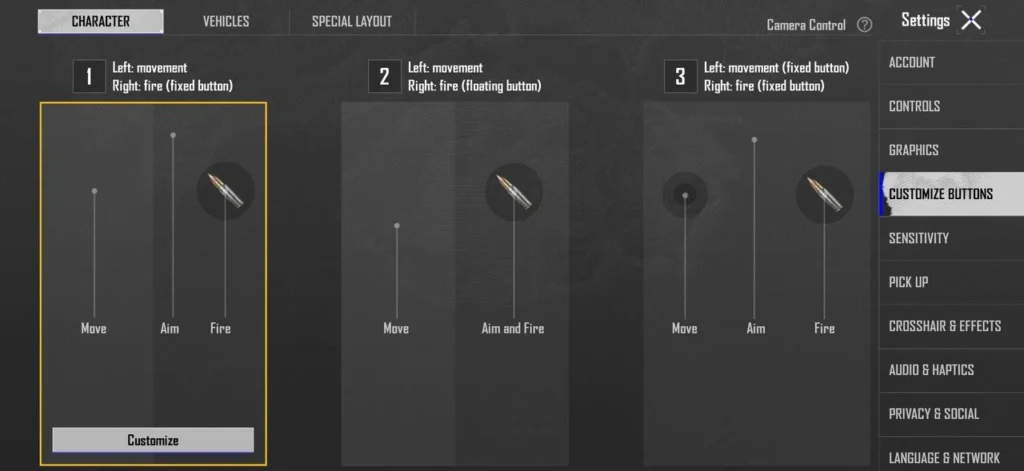
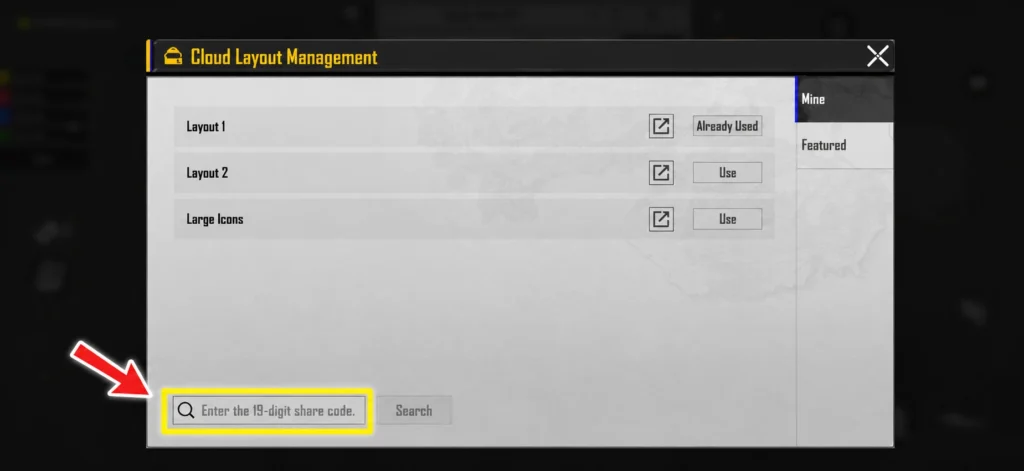
Step 4: Click on Layout 1.
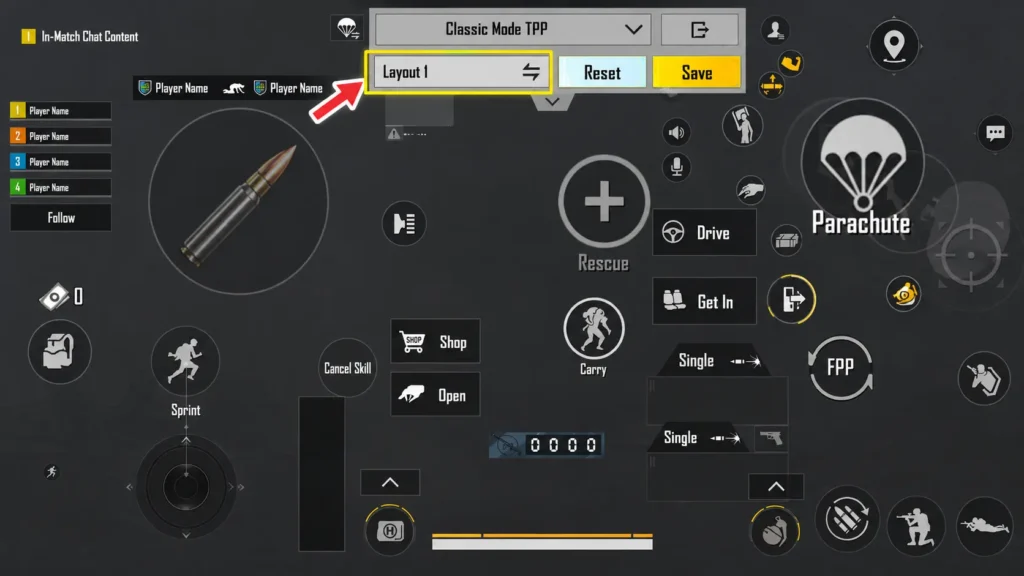
Step 5: Click on the Search Icon and type the code.
Explore 600+ Stylish BGMI Names
Looking for a unique in-game identity? Find stylish BGMI names, fonts, symbols, invisible characters, and ready-to-copy name ideas for boys and girls.
BGMI Name Style: 600+ Stylish Names, Fonts & Symbols for BGMI (2026)Why WMax Gaming Uses High Gyroscope Sensitivity?
WMax Gaming’s high gyroscope sensitivity suits his aggressive gameplay and fast reflexes in BGMI. Higher gyro values can help with quick recoil adjustments, faster target tracking, and rapid aim movements during close-range fights. This type of setup can be useful for players who rely on quick reactions and aggressive engagements.
However, high sensitivity may feel difficult to control for beginners. If you want to try WMax Gaming’s settings, start with the values that feel comfortable and gradually adjust them through regular practice.
Tips Before Copying WMax Gaming’s Sensitivity
- Your playstyle: WMax Gaming’s aggressive and fast-paced setup may not feel comfortable for every player.
- Device performance: Stable FPS and good touch response can make a noticeable difference in how sensitivity feels.
- Screen size: Adjust the sensitivity if your device has a different screen size or aspect ratio.
- Gyroscope calibration: Calibrate your device’s gyroscope properly before testing high gyro settings.
- Start with practice: Test the settings in Training Mode first and gradually fine-tune them for better control and recoil management.
FAQ
What is WMax Gaming’s latest sensitivity?
WMax Gaming uses a high-sensitivity setup designed for fast aim, quick reactions, and aggressive BGMI gameplay.
Does WMax Gaming use Gyroscope?
Yes, WMax Gaming’s sensitivity setup includes Full Gyroscope with high values for faster aim adjustments and recoil control.
What is WMax Gaming’s sensitivity code?
WMax Gaming’s latest sensitivity code is 1-7685-6026-6366-3140-885.
Is WMax Gaming’s sensitivity good for beginners?
WMax Gaming’s high sensitivity may take some time to get used to. Beginners should test the settings gradually and adjust them according to their comfort.
Does WMax Gaming use Aim Assist?
Yes, Wmax uses Aim Assist On
How many fingers does WMax Gaming use?
3 Finger Claw
Can I use WMax Gaming’s sensitivity on any device?
Yes. However, you may need to fine-tune the settings based on your device’s FPS, touch response, screen size, and gyroscope performance.
How do I copy WMax Gaming’s sensitivity?
Go to Settings → Sensitivity → Search/Import, enter WMax Gaming’s latest sensitivity code, and apply the settings if the code is still active.