Scout Op Sensitivity Code: 6974-6421-0793-9028-995
Gyroscope: Always On
Control: 4 Finger Claw Player
Scout Op BGMI ID: 5144286984
Latest Update: August 31
Scout OP Sensitivity is an important setting for players who want better aim, faster reactions, and more consistent recoil control in BGMI and PUBG Mobile. Scout’s aggressive playstyle relies heavily on quick camera movement, accurate sprays, and precise close-range fights, making sensitivity settings a key part of his gameplay. In this guide, we’ll cover Scout OP Sensitivity settings for camera, ADS, gyroscope, and other controls to help you improve aim and get smoother gameplay.
In this guide, you’ll find Scout Op’s latest camera, ADS, gyroscope, and free look sensitivity settings, along with his sensitivity code and tips to customize the setup for your own device and playstyle.
Table of Contents
Scout Op BGMI Sensitivity
Camera Sensitivity
| Scope | Sensitivity |
|---|---|
| TPP No Scope | 70% |
| FPP No Scope | 70% |
| Red Dot, Holographic, Iron Sight & Canted Sight | 20% |
| 2x Scope | 20% |
| 3x Scope, Win94 | 20% |
| 4x Scope, VSS | 20% |
| 6x Scope | 7% |
| 8x Scope | 6% |
ADS Sensitivity
| Scope | ADS Sensitivity |
|---|---|
| TPP No Scope | 70% |
| FPP No Scope | 70% |
| Red Dot, Holographic, Iron Sight & Canted Sight | 1% |
| 2x Scope | 1% |
| 3x Scope, Win94 | 1% |
| 4x Scope, VSS | 1% |
| 6x Scope | 1% |
| 8x Scope | 1% |
Camera Sensitivity (Free Look)
| Setting | Sensitivity |
|---|---|
| TPP (Character, Vehicle) | 62% |
| FPP (Character) | 75% |
| Camera (Parachuting) | 82% |
Scout Op Gyroscope Sensitivity (Latest)
| Scope | Gyroscope Sensitivity |
|---|---|
| TPP No Scope | 300% |
| FPP No Scope | 300% |
| Red Dot, Holographic, Iron Sight & Canted Sight | 300% |
| 2x Scope | 300% |
| 3x Scope, Win94 | 140% |
| 4x Scope, VSS | 140% |
| 6x Scope | 60% |
| 8x Scope | 60% |
ADS Gyroscope Sensitivity
Scout Op ADS Gyroscope Sensitivity (Latest)
| Scope | Gyroscope Sensitivity |
|---|---|
| TPP No Scope | 300% |
| FPP No Scope | 300% |
| Red Dot, Holographic, Iron Sight & Canted Sight | 300% |
| 2x Scope | 300% |
| 3x Scope, Win94 | 190% |
| 4x Scope, VSS | 190% |
| 6x Scope | 60% |
| 8x Scope | 60% |
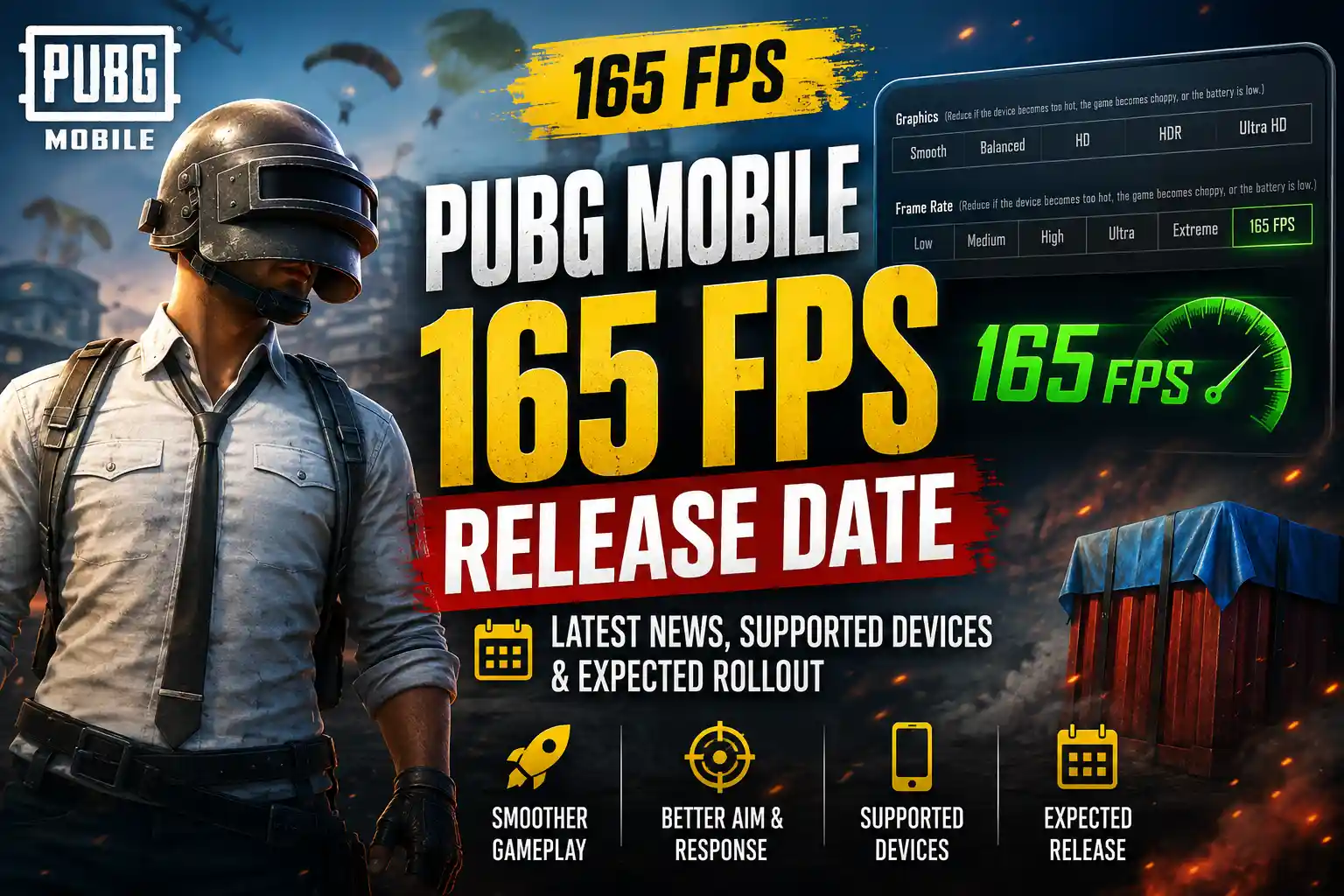
Scout Op’s Gameplay relies heavily on gyroscope aiming rather than thumb dragging, If you’re wondering when PUBG Mobile will officially support 165 FPS, check our detailed guide on the PUBG Mobile 165 FPS Release Date for the latest updates and device compatibility.
allowing smoother recoil control and faster target tracking during competitive matches.
Scout Sensitivity Code 2026
Note: Sensitivity codes may change whenever Scout updates his settings, switches devices, or after major BGMI updates. If the code becomes invalid, you’ll need to enter the sensitivity values manually.
How to use Scout BGMI 4.5 Sensitivity Code 2026 in your Device in 4 Steps?
Importing the sensitivity code takes only a few seconds:
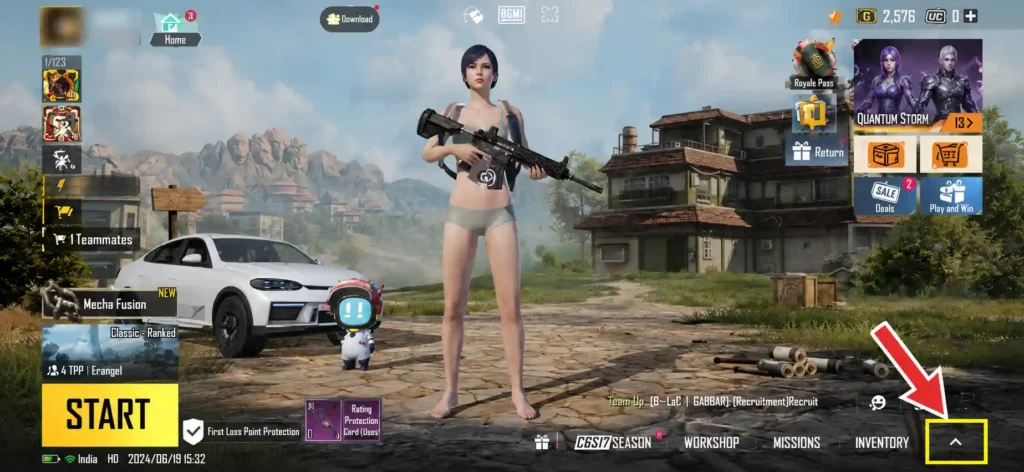
Step 1: Tap on the arrow on the bottom right corner of the screen to open settings.
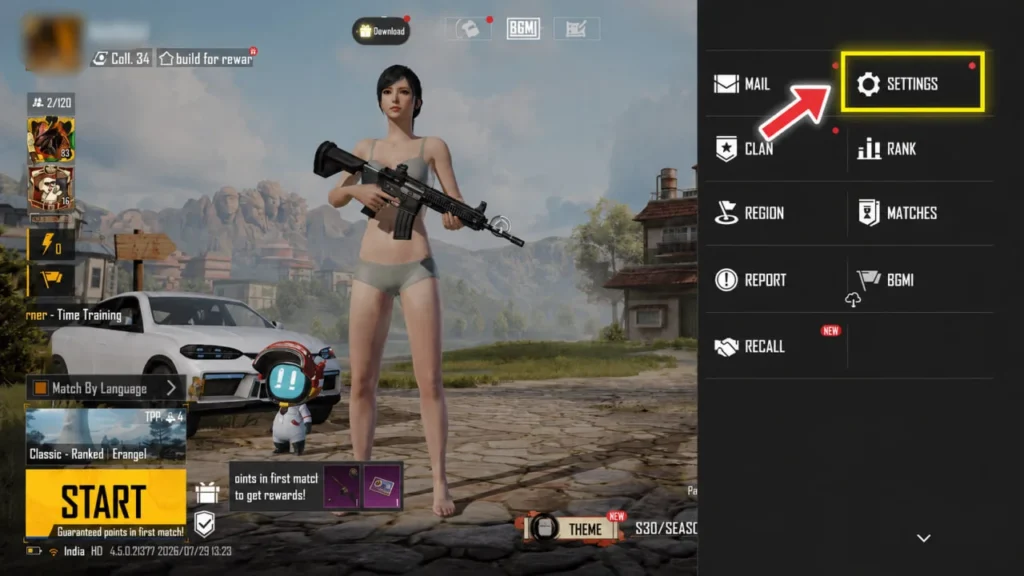
Step 2: Click Settings.
Step 3: Click on the Search Icon.
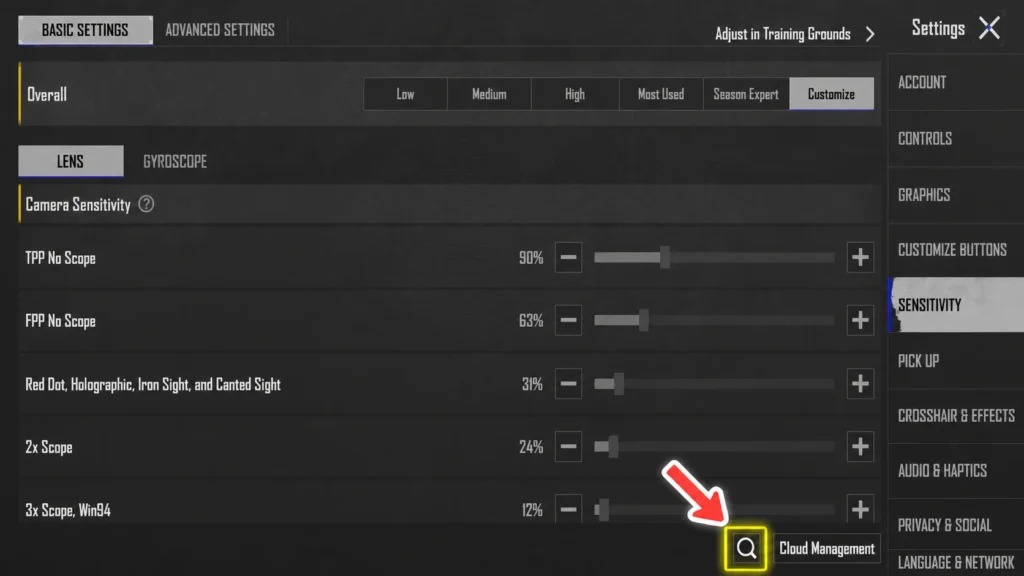
Step 4: Click and Paste the Code.
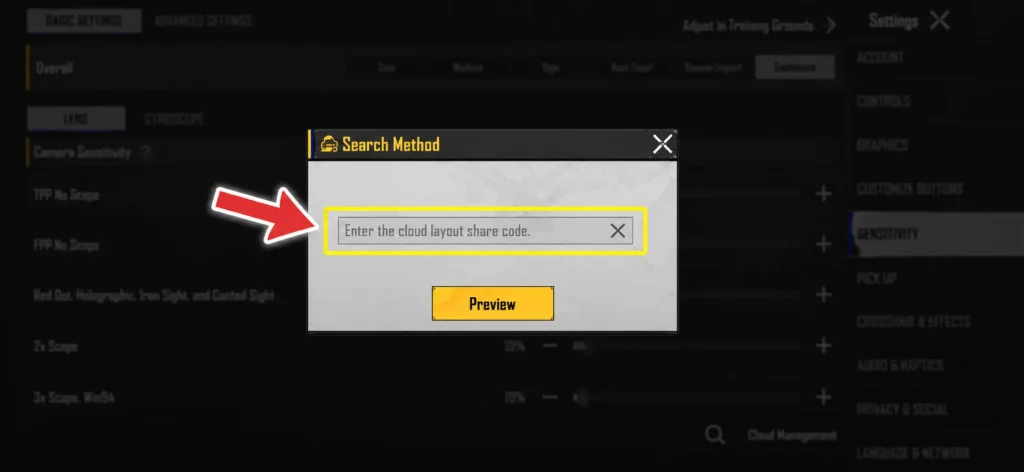
Now you are ready to use Scout Op’s Sensitivity.
Scout Control Code 2026
If you want to experience BGMI Scout Op’s sensitivity code 2026 and button layout without recreating it manually, you can import his latest Scout Op control code 2026. This allows you to copy his HUD layout in just a few taps and use a setup similar to the one seen in his gameplay and livestreams.
Note: Scout Op may update his control layout after major BGMI updates, device changes, or gameplay adjustments. If the code is unavailable or no longer works, you can recreate the layout manually using the screenshots provided below.
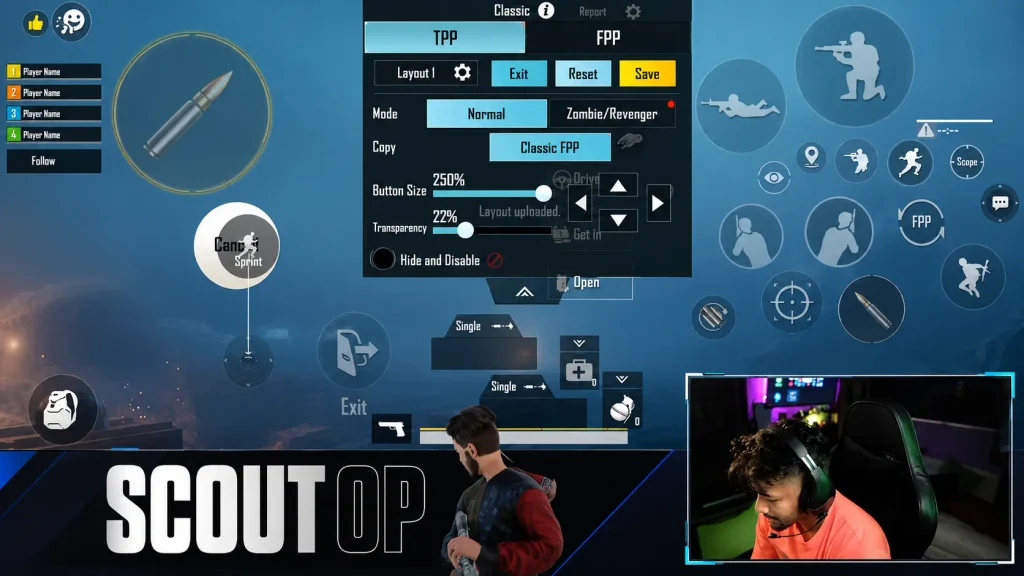
How to Import Scout Op Control Code?
Here is how you can use Scout Op’s control code in 5 steps:-
Step 1: Tap on the arrow on the bottom right corner of the screen.
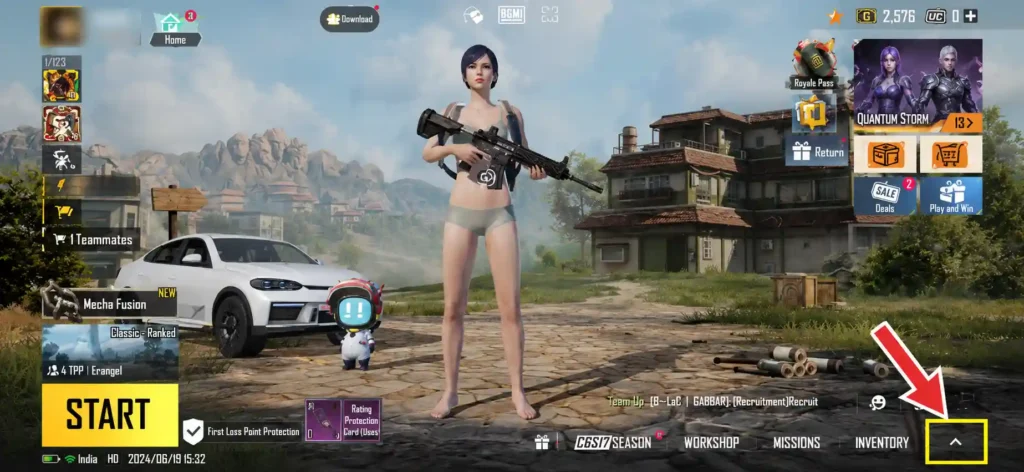
Step 2: Click the Setting icon.
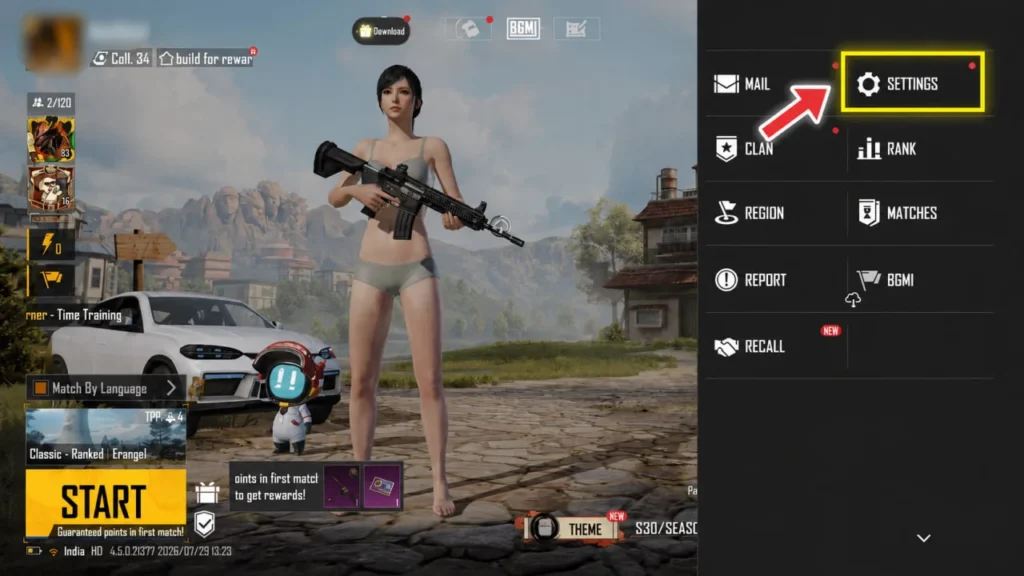
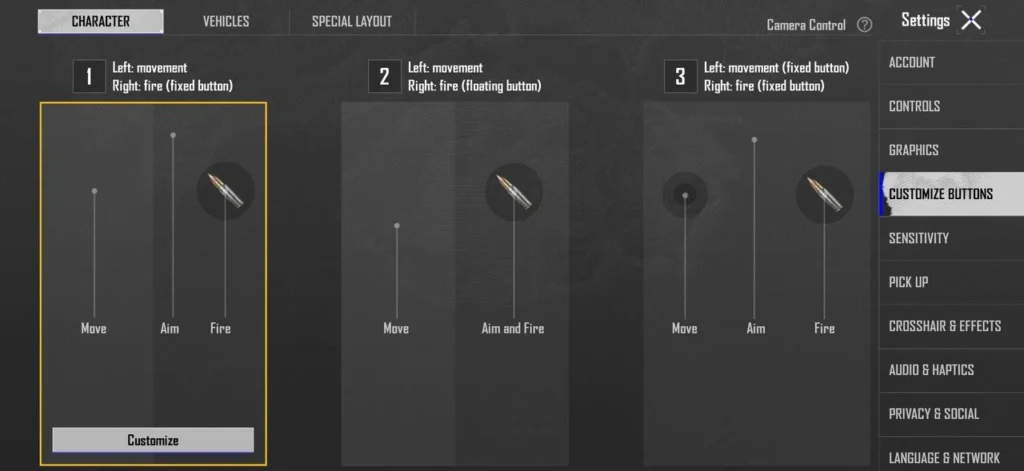
Step 3: Click on Customize Buttons and Customize.
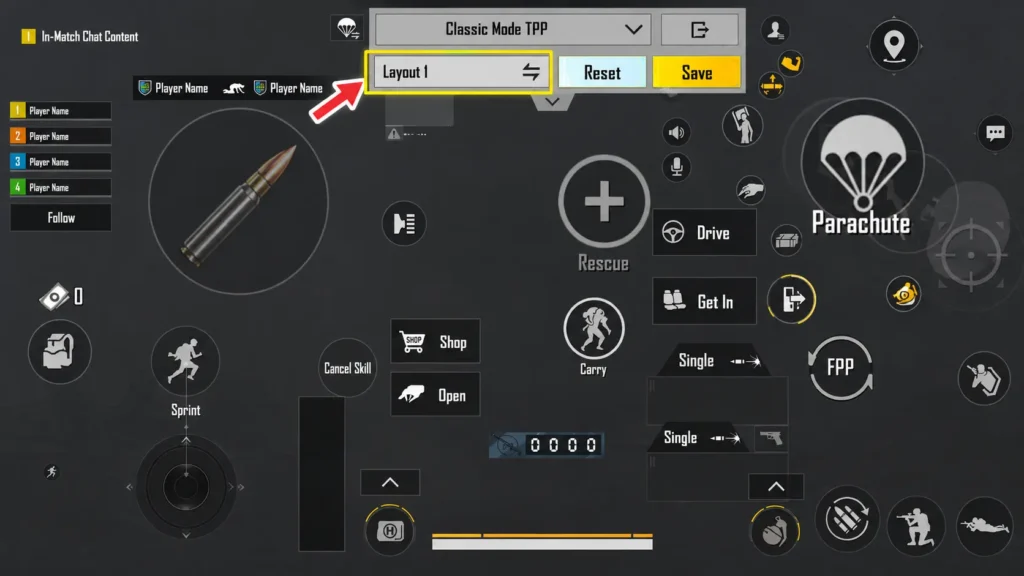
Step 4: Click on Layout 1.
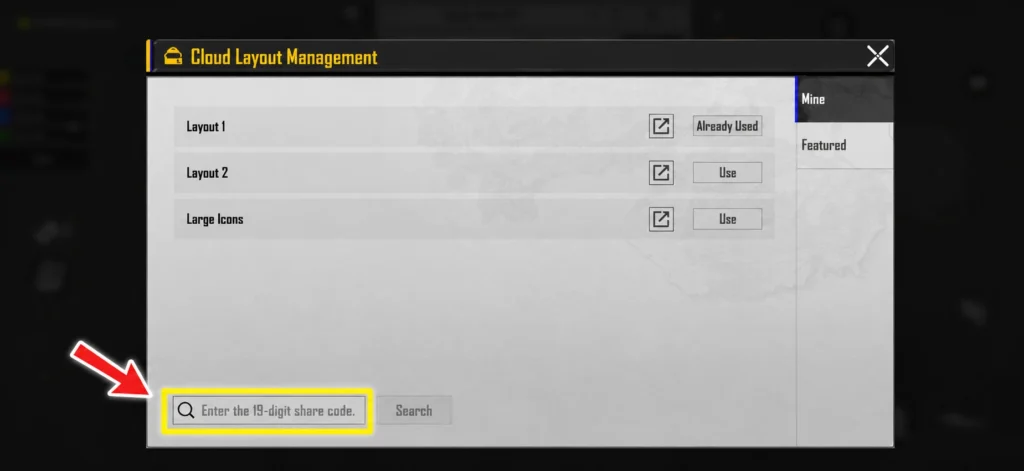
Step 5: Click on the Search Icon and type the code.
Why Scout Op Uses High Gyroscope?
Scout Op’s gameplay relies heavily on high gyroscope sensitivity to get better recoil control, smoother target tracking, and quicker reactions in competitive BGMI matches. His gyro-focused playstyle enables precise sprays with less thumb movement, making it particularly effective for aggressive gameplay. However, beginners should avoid copying his sensitivity settings directly and instead start with lower values, gradually increasing and fine-tuning them through regular practice.
Tips Before Copying Scout Op’s Sensitivity
- Every player’s grip is different.
- Device performance affects sensitivity.
- Screen size matters.
- Gyroscope calibration varies.
Jonathan Gaming Sensitivity 2026: Best BGMI Settings
Want to play BGMI with settings similar to Jonathan Gaming? Check his latest camera, ADS, gyroscope, free look sensitivity, sensitivity code, control code, and tips for customizing the settings for your own device.
Jonathan Gaming Sensitivity 2026FAQ
What is Scout Op’s latest sensitivity?
Scout Op uses a high gyroscope-based sensitivity setup optimized for competitive BGMI gameplay. The exact values may change with game updates.
Does Scout Op use Gyro?
Yes, Scout Op plays with Gyroscope Always On, which is a key part of his aiming and recoil control.
Is Scout Op’s sensitivity good for beginners?
Not really. Beginners should start with lower sensitivity values and increase them gradually as they improve.
What is Scout Op’s sensitivity code?
Many Youtubers shared sensitivity codes are available online, but they may change after major BGMI updates.
What is Scout Op’s control code?
A commonly shared control code is 7120-0801-9246-1097-071, though it may not always reflect his latest setup.
Which phone does Scout Op use?

Scout Op has been seen using the latest Apple Iphone 17 Pro Max from his recent BGMI live stream video.
How many fingers does Scout Op use?
Scout Op currently uses 4 finger claw setup.
Does Scout Op use Aim Assist?
Yes, He Plays with Aim Asisst “ON“
Can I use his sensitivity on any device?
Yes, but you may need to adjust the values based on your device’s screen size, refresh rate, and gyroscope performance.
How often does Scout Op change his sensitivity?
He occasionally tweaks his sensitivity after major BGMI updates or when switching devices, but his gyro-focused playstyle remains largely consistent.
Conclusion
Scout OP’s sensitivity settings are widely followed by BGMI players because of his fast gameplay, precise aim, and strong control during close- and mid-range fights. However, copying his sensitivity settings alone will not automatically improve your performance. The ideal setup depends on your device, touch response, gyroscope control, and personal playstyle. Use Scout OP’s sensitivity as a starting point, practice consistently, and make small adjustments until you find settings that feel comfortable and help you maintain better aim, recoil control, and movement in your matches.